

This article was updated in April of 2009 after Mark at Precision Camera, our favorite repair shop, provided us with some additional information.
This is probably the most boring article I’ve written for LensRentals. (Personally, I like Smashed Front Element the best.) But, I love a good mystery, and I love debunking dSLR “urban legends”. Every so often I run across an online forum where someone makes broad statements about Error 99 which I know are incorrect or at least incomplete. As is my practice, I’ve boldly charged into these online gunfights devoid of intellectual ammunition (i.e. facts). And predictably, the intellectual level of the discussions quickly spirals down from “Is not”, “Is so” into the traditional online-forum sign-offs of “You get Err99 because you’re a bad photographer” and “if you’ve never gotten Err99 you’re obviously not taking many pictures”.
Because Canon Corporate apparently believes that releasing no information about a problem makes it go away, there is little factual information to debunk the online myths regarding Err99 unless you really do a lot of digging. Googling Err99, Canon EOS error codes, etc. brings up several dozen pages of links most of which are the above mentioned “discussions”. There are a few nuggets of truth out there, though. The most complete of these is a multi-year 2,300 post discussion of Err99 problems at Richard’s Notes. There are also a few thoughtful and factual discussions that have taken place in some of the better forums online. After spending far more hours than I intended looking through these sources to settle an online debate, I thought I’d write a summary of what I found and what we’ve experienced here— LensRentals has over 700 Canon lenses and over 50 Canon bodies (as of December 2008), so we have a bit of Err99 experience.
The Myths
Some of the most common Err99 myths are listed below. Strictly speaking, they are not myths; almost every one is true. The myth part comes from thinking that any one of them is actually the cause of Err99. So:
- Err99 results from an electronic communication problem between the lens and the camera.
- Err99 results from using third-party (i.e. Sigma, Tamron, Tokina) lenses.
- Err99 means that electronic circuitry in the lens has failed.
- Err99 means that electronic circuitry in the camera has failed.
- Err99 results from using third party batteries.
- Err99 is a firmware issue, and can be fixed by upgrading to the latest firmware.
- Err99 started with Canon XT and 20D cameras.
There are a lot more. Almost all of them are true for at least some cases of Err99. The best myth, though, is that Canon purposely created error 99 to prevent the use of third party lenses. As best I can tell, that one isn’t really true, but it does make fun speculation. And, of course, Canon’s nearly total silence on error 99 and other problems certainly helps feed the conspiracy theorists among us.
A Brief History of Error 99
Canon no longer officially comments on Err codes, but if we go back to the golden days when they did, we can unravel a lot of the Err99 mystery almost immediately. Back in 2000 Canon released its first mainstream DSLR, the 3.1 megapixel D30. The manual contained a helpful list of the camera’s built in error codes:
- ERR 09: System Error. This error occurs when the EOS D30’s self-checking system processing time has exceeded the specified limit.
- ERR 22: CF DRIVER. Data cannot be written to the CF card for some reason or another.
- ERR 23: NO SPACE LEFT ON THE CF CARD. Space remaining is smaller than needed to complete the write operation.
- ERR 50: CF FORMAT. The CF card cannot be formatted in the camera.
- ERR 51: PLAY MODE. The CF card cannot be played back in the camera.
- ERR 80: SHUTTER. The shutter operation sequence has not been completed correctly.
- ERR 81: MIRROR. Mirror up/down status cannot be detected during shutter release.
- ERR 82: STROBE. The built-in flash cannot be charged.
- ERR 83: POP UP. The built-in flash’s pop-up operation cannot be detected.
- ERR 84: LENS COMMMUNICATION. Electronic communication with the lens cannot be established, or the aperture diaphragm cannot be controlled.
In 2002, the D60 was released. It had a reduced set of error codes:
- ERR 01: LENS COMMMUNICATION. Electronic communication with the lens cannot be established, or the aperture diaphragm cannot be controlled.
- ERR 02: CF DRIVER. Data cannot be written to the CF card.
- ERR 04: NO SPACE LEFT ON THE CF CARD. Space remaining is smaller than needed to complete the write operation.
- ERR 05: POP UP. The built-in flash’s pop-up operation cannot be detected.
- ERR 99: SYSTEM ERROR. There is an internal malfunction detected during the camera’s self-checking procedure which is executed before every attempted exposure.
Key point: Error 99 is a catch-all which can mean almost anything went wrong.
As far as we can tell, the Canon error codes have remained the same through the 50D and 5DMkII camera bodies, at least nominally. The more recent bodies have added an Err 06 code for ‘sensor cleaning unit malfunction’, and there are now Err 10, 20, 30, 40 … 80 codes on 5DMkII cameras (with the useful message ‘Shooting is not possible’. Duh!). Also some more recent manuals now define Eee99 as “an error other than one of the above (Err01-Err06)” has occurred. The only semi-official statement from Canon in recent years is one from Chuck Westfall in TheDigitalJournalist saying “[Err99] is a non-specific error code which can be caused by a wide range of malfunctions. … a variety of problems can be caused by the use of non-Canon accessories such as lenses, memory cards, battery packs, electronic flash units, etc.”
Now, Let’s Speculate
We know from the above that the Err99 code has existed since the D60, but most of the current Err99 online discussion and speculation started around 2003-2004. A large part of this is for obvious reasons: the number of Canon SLRs in service exploded around 2003 and 2004 with the introduction of the Digital Rebel and the 20D cameras. There are some other factors that may have contributed to the marked increase in Err99 reports around this time. Several changes that occurred, but probably did not have much to do with the Err99 increase include:
- The EF-S lens mount was introduced in 2003 with the Digital Rebel.
- Canon flash systems changed to E-TTL II in 2004. E-TTL-II largely incorporates a change in the flash calculations done in the camera body and communicated to the flash unit through the hot shoe. (Some people state Err99 problems involving flashes have only occurred since this change, but these are rare at any rate.)
- In 2003 Canon increased the number of autofocus points in prosumer cameras from 3 to 7 (10D) and again to 9 in 2004 (20D).
- The Digic image processing chip was introduced in prosumer cameras in 2003, and the more powerful Digic II in 2004 with the 20D and Rebel XT.
There are a few changes, however, that logic suggests might have had some causative effect on Err99 messages.
Lens-to-Camera Electronic Communication
Although Canon hasn’t said so specifically, pretty strong circumstantial evidence indicates that the electronic connections between lens and camera were changed at least once and probably twice since 1998. The first change is probably better documented and seems to have occurred first with the EOS 3 and EOS 1V film cameras, which introduced the 45-point autofocus system later used on the 1D series digital SLRs. A number of third party lenses (mostly Sigma) would not communicate autofocus information with these cameras, and required re-chipping by the manufacturer to regain compatibility. The same problem occurred with the introduction of the 10D digital camera, which increased prosumer autofocus points from 3 to 7 and introduced the Digic processor. Of note, those incompatible third party lenses gave an Err99 message, not Err01, when used with the 10D. As best I can find, the first widespread Err99 reports occurred when third party lenses couldn’t communicate electronically with the new 10D camera, and the soon-to-follow Rebel and 20D. This is the source of many people’s partially incorrect belief that Err99 always means a miscommunication between camera and lens.
Lens Current Draw
The second change is less clearly established. Some sources state that lenses with IS systems have higher electric current transmitted from the camera than other lenses do, which makes sense, considering that they have more work to do. In-lens image stabilization first appeared in 1995 with slight improvements in 1997 and 1999. A major improvement was made in 2001 with the faster IS system used in the 70-200 f/2.8L IS and again in 2006 with the new four-stop system in the 70-200 f/4L IS. The newest IS systems are more powerful and stabilize more quickly (0.5 seconds as opposed to 1 second with older systems), so it’s logical to assume they draw more current across the connections, although this is not documented anywhere that I can find.
Several lenses with newer IS, including the 70-300mm f/4-5.6 IS (2005), EF-S 17-55mm f/2.8 IS (2006), and 70-200mm f/4L IS (2006) became very popular with photographers shooting EF-S mount cameras. We know that malfunctions in some of these lenses, most commonly reported with the 17-55 f/2.8 IS, cause Err99 (and not Err01) on EF-S mount cameras. Cleaning the electronic contacts on the camera and lens will often fix, or at least improve the problem. There are a few reports that the problem is more common with original Digital Rebel and 20D cameras, and less common with newer cameras; our data supports this too. Some knowledgeable people have speculated that there was a change in contact alloy, a thinner layer of gold plating, or other electrical contact issues with the XT and 20D cameras that make it more difficult for these cameras to deliver the required current to the newer IS lenses. On the other hand, the problem may simply be more common with older cameras because the lens contacts are more likely to be worn.
In-Camera Voltage Drops
Another theory that has some factual basis was reported several years ago on DPReview. A tester found that Canon 20D cameras would display Err99 if the camera voltage fell below 7.3 volts. The BP511 battery used in all prosumer cameras prior to the 5DMkII should deliver a bit over 8 volts in fully charged state, but will fail to deliver sufficient voltage in certain conditions: dirty contacts, failure of a cell within the battery, age, rapid power consumption, or some combination of the above. This certainly would explain the Err99 problems occurring with bad batteries or bad battery contacts. Again, just speculating, but I would suggest that a fall in voltage across just part of the camera circuitry would also cause Err99—for example, across dirty or corroded electrical contacts, across a cracked ribbon cable, or perhaps a slightly corroded circuit board connector. I’ll come back to this idea later.
Common Causes of Err99
I’m listing these in my own perceived order of frequency, combining our experience at LensRentals with reading countless online Err99 reports. The list has been revised after further information from Precision Camera about actual causes they see during repair. One important thing they reminded me of: when we see Err99 on the screen, the camera actually has more information about the cause of the error internally. A repair shop can read this information from the camera and often determine the cause with complete accuracy.
- Lens/camera electrical contact failure
- Lens circuit (AF or IS) failure
- Camera electronic circuit failure (see below)
- Battery or Grip problems
- Broken or stuck lens aperture diaphragm – Note: this most often happens only when the lens is completely stopped down. If you have questions about the lens, shoot it both wide open and stopped down. If Err99 appears when stopped down, its an aperture issue.
- Older third-party lens with incompatible electronics
- Jammed or damaged camera shutter curtain
- Mis-formatted or damaged card
- Damaged or corroded cell within camera battery
- Failure of the sequence motor—according to precision this is unusual, but does occur, especially in older cameras that have been through a shutter replacement.
- Corroded battery or camera contacts
- Incorrectly mounted battery grip, particularly if it’s too loose
- Camera/hot shoe electrical contact failure
- Moisture condensation within camera or lens (or corrosion occurring days or weeks after moisture exposure)
Most of us cannot define in-camera circuitry failure more specifically than “it went to Canon for repair”, but a few skillful individuals have disassembled their Err99 frozen cameras and reported things like loosened solder splats that were causing shorts, ribbon cables not firmly seated in their connectors, loose metal shields in the camera that could move enough to short or ground an electrical part, etc. If you’ve never seen the insides of a digital SLR, there are an amazing amount of electronic connections packed into basically no space in there.
Experience at LensRentals.com
There are a number of “what to do when Err99 occurs” lists that I’ve summarized below. Before we jump to them, though, I think its important to try to narrow down the Err99’s cause, rather than to go through the list and hope everything is better. I realize “finding the problem” sounds remarkably obvious, but bear with me for a second. With hundreds of lenses mounted to hundreds of different cameras at any one time, we deal with a lot of Err99 problems. Some Err99 issues are specific and immediate: suddenly the camera starts giving Err99 with almost every shot. Resetting the electronics helps for a few shots—or doesn’t—but the problem recurs and the camera is basically useless. These “catastrophic” Err99 episodes usually means there’s been a major injury in the camera or lens: shutter failure, circuitry burnout, etc. Sometimes the fix is easy—new battery, smoothing a jammed shutter curtain, changing lenses, etc… but most often a trip back to the mothership for either the camera or the lens is in order.
Other Err99 problems are more subtle: Err99 shows up after a lens change, lets say. Cleaning the contacts makes it go away, but it comes back a week later, getting more frequent over time. It may just be with one lens at first, but may start occurring with other lenses. In these cases I think it important to remember the point about electrical voltage made above: if voltage drops below 7.3V in the camera’s circuitry, Err99 is likely to occur. Voltage drops across different connectors are cumulative, and batteries produce less voltage as current increases. What may seem a case of dirty contacts may really be a narrow power margin, due to oil on the lens contacts, an old battery that’s not producing its rated voltage when fully charged, a lens that’s sucking down power to run the IS servos, which finally drops below the lower operating threshold when autofocus is activated. Cleaning the lens contacts might help, but that doesn’t make it “the problem”. So, be careful when diagnosing an intermittent problem. Its also important to do everything you can to narrow down the problem. Sending the camera to Canon for “intermittent Err99” without more information is likely to lead to “can’t reproduce problem” at the Canon Service Center.
For example, once or twice a month we’ll have a customer tell us “the lens is causing Err99 on my camera, none of my other lenses do that”, so we send them a replacement. We have the luxury most individuals don’t get in that situation: the ability to test that lens on multiple cameras, plus the customer will try another copy of the same lens on their camera. In some cases, the customer will tell us the second lens is the same as the first on their camera; meanwhile, the first lens seems fine when tested on other bodies. Here, the problem is a weakness in the customer’s camera body that became apparent only when a lens with heavier power requirements was used. In other cases, the second lens works fine for the customer and the first lens, when returned, gives Err99 on other bodies. Again, problem obvious, the lens had internal damage to the electronics or aperture system.
In a lot of cases though, the problem is less obvious. The new lens works fine for the customer, the old one seems to work well on other bodies. At first, we just shrugged our shoulders and said “one of those things” but over time, as we track the problems that occur with various copies of lenses and cameras, something became apparent to us. Unless we found the specific cause of Err99 and corrected it then the problem, while intermittent, would recur. We’ve worked on developing an Err99 stress test for lenses that only show the problem intermittently: we use an older camera body, halfway charged battery, and take up to several hundred shots being sure to change the aperture, zoom, and focal distance frequently. Doing this we’re sometimes able to reproduce the problem in a lens that otherwise seems to have just had some isolated Err99 reports.
That being said, there are also circumstances where Err99 has occurred and then never, ever happened again:
- Using older battery (solved after replacing battery)
- Bad CF card (solved after replacing card)
- After marked temperature change (solved after letting the camera sit for a day or so, probably condensation)
- After mounting battery grip (solved after remounting the battery grip)
- With single lens only, all other lenses fine (solved by repairing the lens)
- Early copies of 50D (solved after firmware update)
- Camera used with third party shoe mounted flash (solved after flash removed)
- Dirty contacts (solved by cleaning, sometimes that is the only problem)
- For no apparent reason, it went away for good after doing the routine Err99 protocol. This part reminds me of “any sufficiently advanced technology is indistinguishable from magic”…
The LensRentals Error 99 Process
This is based on Canon’s technical support suggestions, with a couple of additions we’ve made as we gained experience.
First, we pull a “tech support” reboot.
- Turn camera off.
- Remove battery.
- Replace battery.
- Turn camera on.
- Try a shot.
Sometimes that works. If not then a full reboot:
- Turn off the camera.
- Remove the lens, battery, date-time battery (see below), and CF card.
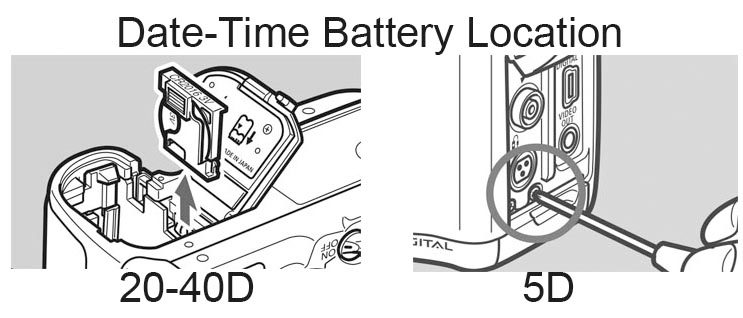
- Allow the camera to sit without power for approximately 20 minutes with the power switch “on”. Recharge the battery during this time. (Full disclosure here: somebody once suggested the 20 minutes and power switch on part, we want to top off the battery anyway, and we’ve generally got other stuff to do so we do it this way. Waiting 30 seconds and using a different, fully charged battery would probably be just as good, but this is what we do.)
- Turn off the camera, replace the backup battery, insert the fully charged battery, turn on the camera.
- Press the shutter button to check for Err99.
- If Err99 occurs, remove the battery, examine and clean the battery and camera connections. If at all possible, try a different battery.
- If Err99 still occurs, use the manual sensor cleaning function to raise the mirror and open the shutter. If the shutter does not completely open, it is the source of the problem. If a leaf is out of alignment, some people have reported using a soft brush to move the shutter leaf back into place. Personally, I’d send it in for service.
- If Err99 still occurs, the camera almost certainly needs service. You might try reinstalling firmware, but it’s unlikely to work.
If there’s no Err99 after the above, the next step is to check the storage system:
- Insert and format CF card, then press the shutter button as you would to take a picture.
- If Err99 try a different brand and size of card. If no Err99, the problem was the card and you should be done.
- If Err99 still occurs with a different card, the problem is with the camera’s card connections, and repair will be necessary.
Finally, check the lens:
- Turn the camera back off.
- Gently clean the contacts on both the lens and the camera (see Note #2 below)
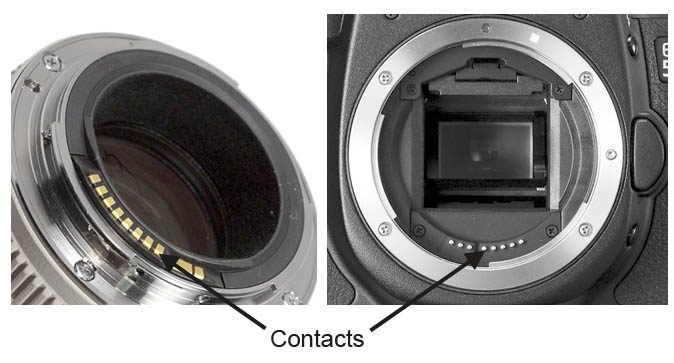
- Remount the problem lens, set to manual focus, IS off, widest aperture and take a picture.
- If no Err99 with everything off, activate autofocus, then IS, then stop the aperture down, taking a picture to confirm no ERR 99 after each step.
- If Err99 occurs, try a different lens. If only one lens is a problem, that lens needs servicing. You’ll get better service results when you can be specific: i.e. “Err99 only when IS activated, etc.” in your service request.
- If Err99 occurs with more than one lens, and no other cause is apparent, the camera needs to head to Canon for repair.
Note #1: Some Err99 problems occur only with the camera in certain settings: i.e only in Av mode, or only in AI servo. In these cases, repair is almost certainly needed.
Note #2: I know first-hand that Canon Service Techs use the “gently rubbing a clean pencil eraser” technique of cleaning the electrical contacts. I also know that knowledgeable electronic engineers state this is a bad idea, that the friction could wear out the gold plating on the electronic connections, leading to corrosion. Radio Shack and other electronics stores sell electrical contact cleaning solution that can be used with a Q-tip or soft cloth to clean the contacts as an alternative. I’m still using the eraser; I figure if rubbing metal contacts across each other every time I change a lens isn’t wearing out the coating, the pencil eraser sure isn’t.
Conclusion
I know this has been an overly long and probably not-very-useful essay, but it’s a topic I really got into. I certainly will have made some omissions or mistakes in something this long and complex. I welcome corrections and suggestions from any of you with different experience in this area and plan on updating and upgrading this piece as I get more input.
124 Comments
josephdietrich ·
I, for one, found it to be a very useful essay indeed. You basically fixed my camera. Thanks!
Roy Bailey ·
Thankyou I found this very helpful. Manual clean of sensor fixed error 99 on 1d3. Dont think I would have tried that and would have gone through the process of return to service centre. Now a happy photographer again.
Garrett ·
In the process of doing your tips right now. But everything makes perfect sense the way you put it.
Emmanuel ·
The auto focus pin is depressed in my camera, its stuck down. due to a 50mm lens that was stuck and was forced out. so far i was only able to take out the two screws in that area and i’m having a hard time taking out the 4 silver screws in the silver ring above it. i only have a small phillips screwdriver with thin metal grip. Is this a fix i can do at home? what should i do
HuwAlban ·
A very useful and informative article. Found this from a referral on Facebook, and will be making sure that all my other Canon using photo friends out there know about.
Thanks, and best regards,
Huw
KATGV ·
Hello I just had this problem today for the first time. Canon Rebel XSi 4 years old, ScanDisk HC2 16GB card, original Canon Battery, 1995 Canon EF75-300 IS lens with IS on, shutting the camera off and on numorus times did not help, took out and put back in the battery (per the error code instructions) did not help, put in my aftermarket backup battery seemed to correct the problem, even though both batteries showed to be fully charged. just thought I’d add my 2 cents.
randy ·
i have been getting the error 99 for about a year now. called canon tech and after taken me some steps with my Rebel, he said that to send it in would cost more to repair than the camera was worth,BUT, they were having a special on other Canon camera’s, and i could use mine as a trade in and they would give me about 100 trade in value. i hung up on him.
i tried the pencil eraser idea and that didn’t work. i think i’ll try buying a new battery(don’t have a backup), try that. and if that doesn’t work, keep looking for more ideas.
jack ·
Hi
My 30D started giving me this error99.
I have a EFS 17-85 IS lens.
one thing I noticed was that the error only comes when it is bright out.
In trying to shot a sunset it constantly gave the error. But as soon as the sun slipped behind clouds and the dimmer light dominated, I could shot away to my hearts content. Then when the bright sunset returned from the clouds….error99.
Any ideas beyond what is written in your article? I tried different batteries and CF cards but no change.
thanks
Jack
Roger Cicala ·
Jack,
I expect your shutter is starting to fail: in bright sunlight when shutter speeds are high it can’t cope and is giving ERR 99.
Roger
Charles ·
Error 99 is always appear when I am shooting used my Canon EOS400D with 17-85 zoom lens in the range from 17mm to about 30mm. But error 99 never appears when my lens used in range from 35mm-85mm.
Error 99 message would be given when I use my same zoom lens 17-85mm on other Canon digital canmera body as EOS Rebel XTi.
I did clean both contact points, Lens and Canmera body, but it didn’t work.
Please give me more idea to solve this problem.
Thanks.
Roger Cicala ·
Charles, it sounds like there’s a short in one of the ribbon cables in your lens. At certain focal lengths the cable is losing connection and giving ERR99, at other focal lengths it’s doing fine. Sounds like a trip to Canon is in order.
Roger
Charles ·
Thank you Roger Cicala.
I did make an typing eorror on my sentence:
“Error 99 message wouldn’t be given when I use my same zoom lens 17-85mm on other Canon digital canmera body as EOS Rebel XTi.”
Please give me more idea.
Thanks again
Nellie ·
Oh my God, this totally fixed my camera! I’ve been so frustrated about this, and finally I found an answer. Thank you!
Chris Cooke ·
Firstly let me say that I have never had any Error codes on any of my 6 Canon Cameras but enough of my friends have for me to read and save your essay and pass it on to my more unlucky friends.
Let me take this opportunity to thank you for the effort and time you have so generously given to addressing this vexed problem and gratis at that, it is folk like yourself who deserve more plaudits than I am sure you receive.
Thank you Sir.
Chris
Mark ·
Jack, the same is happening with my 400D. Only getting the error in daylight. Roger, I am not sure the shutter is the issue. I have dialed down the shutter speed and still get the problem, whereas a higher shutter speed inside with the flash is fine. As it is, I cannot take any outdoor shots. And this is after going through the entire process listed above. Seems strange that the error has never occurred before today, and now effects every shot I try to take. Based on this, logic would suggest its not the battery, contacts, shutter. Just did some more testing and it seems to work fine outdoors on A-Dep, M, Portrait, Close-up and Sports, but not on Auto, Landscape, P, Tv and Av. Am I missing something? What could be a common denominator on these settings? Can anyone suggest any more tests that could narrow down the problem? Would appreciate any help !!
Mark ·
Hmm more testing. I switched off AF and was able to take manually focussed shots on Auto at greater than 50mm. I’m guessing such a specific issue would suggest a lens problem? Thoughts?
Roger Cicala ·
Mark it’s almost certainly a lens problem. We see that exact thing every so often. Usually it means there’s a ribbon cable in the lens that’s cracked or loose. At certain positions the cable shorts out causing the problem, at others it passes enough current.
Ryan ·
Great article! Ok, I have 2 lenses (Canon 28-105mm 3.5-4.5f USM and a Tamron 70-300mm 4-5.6f). The Canon lens NEVER throws and error and NEVER has problems….
The Tamron on the other hand Err 99s my Rebel XT every time I zoom past 180mm (basically I have a 70-180mm lens.) But it is a bit more complex than just that. I played with the settings in Manual mode and found some interesting things… A bit much to type here but in a nutshell, the trouble zone is the “Macro” region 180-300mm (designated with a gold band on the zoom markers on the lens… you cant go into macro unless your in this range…) Well I was able to get photos to work in that range ONLY if my shutter speed was less than 400… anything 400 or higher Err 99 my camera… I cant figure this out because it seems like some things you mentioned here but also doesnt….
Carlos ·
Roger, and all who have commented, thank you for taking the time to help sort Err 99.
Err 99 for me started sporadically, here and there, then all the time. I searched and found you without to much trouble.
I have a Canon EOS 400D with an Ultrasonic EFS 17-85mm Lense. I have just the one Lense.
I opted for this one, more expensive Lense, as it was explaind as being far better than the 2 Lense deals at the time.
After going through your procedure, it seemed to point to a problem in the Lense.
After completing the test with no lense and finding no Error 99 i put on the Lense.
I was indoors, the testing started bad with Err 99 coming up once lense was on.
I repeated the procedure a second time and the camera with lense fitted then worked inside, all seemed to be fixed?
At first it worked but as i tried differant settings outdoors the Err99 came up again. Mark above sugested similar. It seemed setting related when outdoors. I put the Camera in its bag.
The next day i tried the Camera again, Err 99 indoors and out but not on every shot?
I am going to take the Camera and Lense to a local shop. I will be equipped with this info, if they try and stiff me I will be ready. They charge $25 to look at it and test it? Then if they cant fix it they send it to Canon who charge $80 to have a look.
I wont stop asking Canon until they tell me what exactley was wrong once it is fixed!
As a matter of fact they wont get it unless they tell all!
Stay tuned as i will post it here.
Jeryl ·
I did the read and it was long however it was worth it. Thanks for taking the time to do the research and helping out the rest of us. Now i dont have to go out and buy a new camera
Niamh ·
BRILLIANT! A year of frustration with intermittent and then constant err99 fixed in 30 seconds with a pencil eraser. Thank you!
Abbudi ·
Hello Good people, i got a 30D and i started getting this Err99 after my friend took the camera and tried some other lens and the Error continued even after putting back the stock EFS 18-55 back on!
i have tried the following:
took out the battery , the lens and the 1GB CG card ..cleaned the electrik sensors on the camera and the lens with a pencil eraser and after few minutes:
_ I put the battery on and tried to shoot -No Error
_ Added the CF card and tried to shoot -No Error
_ Added the Lens and tried to shoot – Err 99 !!!!
So what happened here? what happened to the camera after trying that other lens?
Roger Cicala ·
Abbudi, did you use the pencil eraser on the camera’s contacts too? There could have been some oil transferred from the lens to them. Otherwise I’d ask what your friend’s lens was. If it was a high current draw lens like a 17-55 IS or 70-200 IS it might have been the last straw in frying a bit of circuitry. That doesn’t seem likely but it’s the only other thing I can think of.
Abbudi ·
Sorry, not CG but CF Card 🙂 (bad keyboard)
Brian Lynch ·
Your article just saved me binning a perfectly good camera with both its lenses – the standard EFS and a sigma zoom -but a bad 4gb compact flash card (£12 worth). I feel a bit daft for nearly doing that. Many thanks.
Travis ·
Thanks for the awesome article, Roger!
The issue that I am having with my Rebel XS is that I get the “Error 99” every time the camera goes from being off to on. I have to take one picture, get the error, and then reset the battery. After resetting the battery, the camera will work fine. However, this is the process I must go through after every shutdown, either manual or automatic. Not exactly ideal if you’re trying to take a quick shot. I know I can turn off the automatic shut-off as a temporary work-around, but I’m looking for a more permanent solution. Any advice would be wonderful. Thank you again!
Roger Cicala ·
Travis,
That one sounds like there’s a circuitry problem in the camera. Assuming you’ve tried a different battery and replaced the date-time battery, I don’t think there’s anything else left but a trip to Canon.
Travis ·
Thanks, Roger. Do you know if the date-time battery is internal on the Rebel XS? I don’t see where it would be accessible without taking the camera apart.
Mark ·
I got the Error99 as well about a week or so ago, and my camera just keeps snapping away uncontrollably, i take the battery out and it stops..but once i pop it in it starts snapping away again without stopping 🙁 I cant make it stop!!!
Peter ·
Hay
I own EOS 40D body and now for 14 days it gives me err99 problem. I managed to test a bit when error occurs. It shows same problem like @Travis has. It works after you put battery in , but soon after camera goes to off, or if I put it to OFF and then ON it shows err99. But I saw that if I take out CF card it works normal…even if I turn OFF the camera and turn it back ON. Also in live view it works fine. I tested 3 CF cards which works perfectly in 7D body…and also tried with different batteries. Didn’t change internal battery, I have in plan to change it today.
What could be the problem?
Peter ·
Forgot to tell…I think it started to give mi these problems after my flesh hot-shoe brake, when was attached to the camera, but I’m not fully shore.
Will Butler ·
Thanks so much, never heard of the aperture issue before, which is certainly what is wrong with my lens. Do i send it off or can i cope with f4-5.6 for the rest of its life!?
Peter ·
Where did all my post go?
Martin ·
Hi. Just bought an EOS350D body to go with my trusty Sigma 50-200 telephoto zoom, which had always worked perfectly with my previous EOS film camera – an EOS850. I’m getting about 90% err99 and the odd 1% of decent exposures. Had it never worked at all then it would be one thing, but for it to tease me by working occasionally is really frustrating.
I’ve tride the eraser-on-the-contacts and aso swapping out batteries (I also have the battery pack grip, but the error happens with that attached too).
I’ve emailed Sigma who told me this lens is not re-chippable; is this the end of the line for this pairing? 🙁
Roger Cicala ·
Martin, I think it probably is the end of the road for this lens: If it can’t be rechipped it’s not going to work with newer SLRs.
Martin ·
Hi, Roger. I think you may be right, although I did tonight take some more test shots with the lens’ autofocus switched off and it performed fine. Maybe I’m just going to have to get used to manual focusing, at least with this lens.
Martin ·
…and then again perhaps not – I took the camera to the coast today and nothing worked!!
Dan ·
Here is an interesting twist – Rebel XT with a 17 – 85mm IS Canon lens that I use as my every day lens.
This only happens when I’m set between 17 and 24mm – once I move it a little past 24mm, I can usually shoot continuous frames with no issues
When the lens is between 17 and 24mm, I usually get this after 2 or 3 shots, and then every time after I flip the power on and off…
I have a Canon 70 – 300mm IS that works fine across the focusing spectrum as well as a Tokina 12 – 24mm that works fine… so I’m assuming that it is an issue with the lense
Roger Cicala ·
Dan, I bet one of the ribbon cables or connections in the 17-85 is cracked. At certain lengths the signal is getting messed up. We’ve seen that several times.
Carolyn ·
It seems to be fixed! I stopped using the Japanese lenses and the Canon lens seems to work correctly. No error 99! Thank you so much!
Nigel ·
I having this issue intermittently with a 1D mkII and with both the canon 15mm fisheye and the 24-105mm f4.0L and only having it come up when shooting sequences on high speed drive mode. This gives me the indication that it is a battery issue. Has anyone else had a similar issue??
Cheers,
Nige
Roger Cicala ·
Nige, it could be battery, could also be shutter.
AndyO ·
Excellent article. Just a shame it isn’t Googles top ranked result!!
To add my dire experience to the list. I just sold a 30D which the buyer reported the issue on (news to me) and have had to go thru the whole Ebay refund experience. The error occurs intermittently and less so after battery removal & replacement.
One factor not mentioned here.. it happens without a lens or card attached so its a fault with neither. The buyer even bought new batteries (and I included 3) so thats out also.
With lens & card it shoots the image and stores it perfectly well to the card also when the error is displayed (on subsequent viewing).
So the only real issue is the actual error message appearing at all! You have to wonder if the error reporting could be bypassed whether there would even be a problem?!! Firmware hack anyone?
Dave Walberg ·
Roger,
Great post, interesting comments. For my situation I have narrowed things down since I have two cameras to test with. With both a Rebel (300) and an XT (350), the problems stays with the 17 – 85 EFS Canon lens. Contact cleaning, battery change, CF card don’t seem to matter. The err99 happens with either camera but NOT when the aperature is wide open. Also, I found that it is related to the 17 – 24mm range. Since I’m also having a problem with autofocus, I guess it is time for a repair (after about 40,000 photos).
Thanks for your rather throrough discussion. Too bad Canon won’t address the issue as much as you have.
Dave
John from PA ·
I just acquired a 60D and I note that although this camera is about a year old, I can’t find any Err99 issues reported with this camera. Any particular reason? With respect to the 60D, is there a date-time battery and if so where?
I also am about to acquire the 17-85mm EF-S lens which does seem to be a bit more prone to the issue. Having said that, I think you hear more about the problems than the good side of things. Should I be concerned about the 17-85mm lens choice
Roger Cicala ·
There are no particular issues with the 60D that I’m aware of. One of my favorite cameras (except for not having autofocus adjustment). The 17-85, though is another matter. If you can swing the extra money I really prefer the 15-85 IS. It’s a much better lens.
Lane ·
Hi Roger,
I read Abbudi’s post and also your reply that what possibly could have happened was damaging the circuitry? The lens I tried on my Canon 450D was a 17-55 IS – after shooting with this lens for a maybe a dozen shots, I then received the error 99. I have tried absolutely EVERY possible solution listed in your essay, but my camera still does not work. May you explain a bit further about what could have happened, how I could possibly fix it, or if it’s a lost cause? Thank you!
Roger Cicala ·
Lane,
I’ve seen that happen several times: a higher current lens like the 17-55 f2.8 IS or 70-200 f2.8 IS is put on a camera that’s been fine, ERR99 starts showing up, and doesn’t go away with any of the usual things. The only cause-and-effect thing that makes sense to me is the camera had to supply more current than it was used to with the bigger lens and something that was borderline crossed the border. It could be a cell in the battery went bad (I assume you’ve tried a different battery) but it could also be a bit of circuitry overheated and died. In the latter case a trip to Canon is the only real solution.
Lou ·
I had gotten an err99 after DROPPING my EOS! Figured I did it in. After reading about lens and contact issues I took of the lens to clean the contacts. It was then that I noticed that the mirror was not straight. When I dropped the camera, the mirror shifted and went out of allignment. I took a plastic fork and gently moved the mirror from the backside. The mirror popped into place and the camera works! I don’t recommend this, but it worked for me. Just another err99 code fix!
Ashish ·
Excellent article. I tried most of the suggestions here, but couldn’t get the error to go away. The only way my 4 year old 40D works is in the Live View. This seems like an issue with the mirror not coming down in time while taking the picture.
Can you please provide some guidance in terms of fixing this issue?
Thanks,
Ashish
Roger Cicala ·
Ashish,
I believe you are correct. There are several gears that can jam the mirror and a local camera repair shop can probably fix them without a replacement.
Susie ·
I have a Canon Rebel xti and for the last four months have been getting the Err99. It happens when I use my Tamron lens, 75-300mm 1:4-5.6 Tele-Macro, and I try to move my f stop any higher than the lowest it will allow me. For example: I have it set at f4 and want to move it up to f4.5 it will do the error99. I just recently had it cleaned after vacation to the beach and it still happens. It doesn’t do it with my other lens, Tamron 28-80mm 1: 3.5-5.6 . So I’ve tried the eraser, I’ve tried taking the batteries out, lens off and card out and the problem is still happening. Any other suggestions??
Roger Cicala ·
It sounds like there’s a problem with the aperture of the Tamron lens: either electrical or possibly something mechanical in the leaves of the aperture. I’d have that checked first.
Roger
Bruce Johnstone ·
Roger, great article covering the issues. I have a 20D that gives the Err99 with a Sigma 135-400 lens. I have found that the camera won’t stop down with the depth of field preview button on that lens only. When the aperture value for an exposure is smaller than wide open I get the Err99 with that lens. I have tried the lens on three different older bodies; D60 and digital rebel and film rebel and it works fine in all modes and stops down with the preview button. The 20D will stop down with all of the other lens I have tried just not the Sigma. Both lens and camera seem fine but just won’t work together. Do you think the Sigma is just trying to draw to much power? I haven’t tried it with an IS lens.
Roger Cicala ·
Bruce, that’s possible, or maybe the aperture electronics are not quite right and just need more power than your 20D is delivering. Trying another high current draw lens like you mention might clarify it, especially if perhaps the 20D battery isn’t quite up to max voltage.
Karen ·
Have the same set up as Susie above- but a Quantary lens- same issue- works fine with the small lens but not the larger…just changed out battery-nothing,changed card-nothing although it took 1 photo then popped up error22…guess we’ll have to take it in and have it checked out…sigh…
Jonathan ·
I have a Canon 30d and have gone through your list of potential fixes to the Error 99 issue. None seemed to work so I decided plug the camera into the computer and remotely trigger the camera just to see if my computer would say something about the error. What I found is even though I fully charged the battery (original from when the camera was purchased) and the camera displayed a full charge, the computer software warned me that the battery was depleted and advised me to change batteries. When the message would pop up on my computer, the error 99 would surface again on my 30d.
Do you think there is a short in the circuitry or I just need to go out and purchase a new battery?
Steve Perks ·
I’ve had ERR99 on 2 Canon bodies: The Rebel XT (350d) which had been in storage for months…problem was sticking pop-up flash mechanism. A little gentle persuasion fixed that for good.
The second was a 1dMk3 which had developed an autofocus problem (blurred images). As part of the elimination process, I upgraded firmware from 1.2.5 to 1.3.0 which I hadn’t done previously as the 1.3.0 relates only to the wireless transmitter improvements.
I got ERR99 on the first exposure immediately after the FW upgrade.
It went away for a while then came back with a vengeance after the camera came back from repair for the AF issue.
The 1d3 has just returned from it’s second visit to the Repair Centre for ERR99 with the fix simply listed as ‘Reset’
The one thing I hadn’t tried was the date/time battery and I can’t help thinking there is some relevance to to it occurring straight after a firmware upgrade?
Mitchell Parsons ·
Thanks so much for this article. It’s the best info I’ve found.
I have a 20D and it has just now started giving me the err99. It only does it when I try to take a horizontal photo. I can shoot vertical or with the camera pointing straight up or down and it’s fine, though the vertical is having its problems in colder weather it seems …
I’m getting through for now by holding my camera upside down for horizontal shots 😛 lol
It does this with any lens and without the lens. Battery pack or not, cf card or not … I started using 4GB SanDisk cards and I ran my batteries dry in my battery pack the same night I began having this problem. Maybe something to do with that? Or it’s the shutter curtain
Jeremy ·
Ashish, did you ever get your camera fixed? I have a 40d with the same problem, it only works in Live View and cleaning the sensor manuelly causes the same error, so I’m guessing its a shutter problem.
Henry C ·
Roger.. great stuff! I have a eos 400d and just got a 2nd hand tamron lens which was in full working order when sold…
when i put it on my body i get intermittant err99 messages, sometimes at certain angles, sometimes once, twice, three times in between resetting it and shooting a few pics. Any way i can check my batt voltage? will a multimeter do? Its a few years old. Cleaned contacts with eraiser…. im a bit stuck for ideas now?
Thanks.
Roger Cicala ·
Henry,
A voltmeter should do it, and be sure to check with the battery partly discharged. Some bad cells can maintain voltage at full charge but not at half charge.
Timothy Takemoto ·
This is the best article on this issue. Fortunately it is linked from the mega thread at Richard’s Notes. I have Err 99 on my 40D. I sent it off for repair and was told 340 USD. I declined and had the camera sent back. It came back with no information regarding the source of the fault or even a repair quote. I was thinking to try the self-doable fixes: lens changing, card changing, battery replacement (button or main), contact cleaning, and shutter blade realignment but if the repair people have more information then I guess that only the last is an outside hope, since the repairers would have tried the others. I note that on Japanese ebay an err99 camera is getting quite a lot of bids suggesting that some folks are hoping for a self fix.I wish Cannon would give us all the more detailed information (maybe using the words “may be”). It also seems to me that this error has a built in obsolency feel too it. So the camera has found an error that it can not diagnose. I wish it would just go ahead and record the photo displaying an error message, even if the quality is degraded. The camera seems to be deciding “if it is not perfect, then don’t take the photo at all.” Please give us the info and the options Cannon.
AJ ·
I have a Canon 450D – I have had it for about 3yrs without fault, until yesterday!! This fault occurred when on live view while taking photo’s of the lunar eclipse – buggered if I know what I did!!
Error 99 appeared out of the blue.. Now when trying to take photo’s noticeably when flash is required it initially displays BUSY then the error 99..
Trying to resolve matter I have checked out various forums – I have recharged the battery, cleaned lens & camera contacts with soft cloth, tried swapping lens – but still the fault appears!!
This article is brilliant – don’t yet know if any of the suggestions will work – but thank you for providing this information..
I am keen to know if others have suffered similar error using Canon 450D.. Did you fix the problem?? What turned out to be the fault??
Regards
Nigel
Andrew ·
I just ran into this problem on my 450D while connected by USB using Digikam, trying to download a wad of raw images. It kept occurring, breaking the USB connection, even though I wasn’t taking pictures. Eventually, I determined that it was related to machine load, as I was also tone mapping some HDR images at the same time. I waited for the tone mapping to complete, then re-initiated the download. I successfully downloaded 2.6GB of images, twice, with one connection while the computer was lightly loaded. As a software engineer, my guess is that the Canon USB firmware has some dodgy empirical time-outs built into their code, which are triggered when the USB connection data moves in fits and starts. Either the Canon USB code or the camera throws in the towel, and the non-specific Error 99 is put up (after a number of seconds). Which explains why USB connections with the camera can be hit-or-miss, generally taking several tries before succeeding.
This leads me to believe that “Error 99” is either a “catch all” error code, dumbed down for the user (as an insult from Canon), or similarly, a general “Communication Failure” error for any subsystem in the camera. Either way, aftermarket lenses that have had to reverse engineer the EOS EF protocol may miss some corner cases, leading to a communication failure. The same problem can occur under a “brown out” (low voltage) condition due to resistive (dirty or worn) contacts or bad battery cells. Logic circuits may or may not operate correctly at low voltage conditions – they are only spec’ed to work above a minimum voltage. Below that spec, you span the gamut of correct to non-operation, including incorrect operation, varying with temperature. Which would lead to communication problems between the camera CPU and the subsystem.
It is unfortunate that Canon has not bothered to answer customer concerns by updating their firmware to display more informative error messages, nor explain the causes of the message. Speaking for myself, I would blame this on poor firmware coding, a lack of coding standards, and a detached management who is more about product marketing than customer support. Too many marketing types are too “busy” to actually learn about the products, and think firmware/software is “magic” and are not interested in hearing about it. Which leads to a lack of emphasis on the firmware, which is dragged and patched from product to product, without the resources to ensure a quality, stable build for each product.
Peter ·
I get error 99 on my Eos20d and the shutter continually activates on turning on the camera. I contacted canon and got the same try this and that email. Not getting an answer from them or a fix I will not trust their products again. Any company who ignores its customers and sells a product that suffers a common fault should be held accountable or boycotted. I would suggest this company is not trading fairly and with the amount of dissatisfied customers kept in the dark about the fault, a petition could be compiled and sent to the office of fair trading standards.
Timothy Takemoto ·
Again in brief, the things that may be done are:
Check: CF card (format), lens (e.g. with no lens), camera lens contacts (clean with rubber), check batteries including button battery, upgrade firmware, de-moisturise, blow clean, realign shutter blades if squew (with risk), try live mode (if it works tells you it is a mirror problem perhaps).
Mine works in live mode. I can’t feel/see/hear anything wrong with the mirror.
Second hand 40Ds are now about the same price as the repair, for about 100 USD more I can get one with a handy lens, shutter replaced. I would have a spare grip, charger and three extra batteries. This cover all tell nothing, high-cost-to-repair error upsets me and makes me think that I’d rather pay someone other than Canon.
Peter B ·
I get err99 when the 18-55mm lens is in wide or nearly wide. Zoomed in the problem does not occur. i am currently trying the last fix suggestion from this page. I suspect that it will not work. I agree with some of the comments – Canon are ignoring a common problem..
Hudson ·
Wow thank you so much for the article I actually was dissapointed when it ended at page six. I recently bought a Canon Rebel XT second hand and for the first 7 thousand pictures it was fine but recently it has popped up all the time always right when I am about to get the perfect shot. I have narrowed the problem down to my 18-55m IS-F lens as the camera is fine with my 80-210 Tamron. I cleaned the connections and it seems to be really hit or miss. It seems like after I turn it on it will either show the dreaded code right away or not at all until I change the settings. I havent found any rhyme or reason to it yet but I will keep on looking. My question is if I should buy a new lens or a new body. I am paranoid that if I buy a new lense the problem will develop on the other lenses or if I buy a new body the lense will still not work. I knew I should have gone with nikon! lol this week i will go to the camera shop and test the body with differant lenses and the lense with differant bodies. Do you have an idea of what the percentage of cameras have the problem?
Thanks a million.
Roger Cicala ·
Hudson,
I have no idea how common the problem is, but if your Tamron is working well I would bet the problem is with the lens. Changing aperture size may show you if the problem is with the aperture system (fairly common).
Hudson ·
I have tried the aperature at anywhere from 3.5 to 32 since it started last week and havent found any patterns. I cleaned it with an eraser and it has gotten a lot better but it still randomly pops up from time to time. I took it to the camera store and of course it worked perfectly there. I switched lens and out of the 20 or so shots I took it didn’t show up at all. Tomorow I will be shooting a lot with both lenses so I may find something.
Hudson ·
It is an aperature related problem. Thank You for your help. above 5.6 or so the it gives me the error code 70 percent of the time.
dncingrl ·
I have a two year old Rebel xs that has started with this err99. We only have two canon lenses so I am not hopeful that it is an easy lens fix. I do recall the camera taking a slight bump while hiking one day and I am pretty sure the error started just after that. I am in the process of trying some of the fixes listed on another site and I am hoping that something works!!! If anyone has any other suggestions, please let me know.
O8h7w ·
I have a 40D with Err99 behaving rather peculiar. Tried everything in this list, closing in on the shutter as a likely cause. The weird part is what happens when I try manual sensor cleaning and live view.
Manual sensor cleaning causes the mirror to flip up and then back down immediately, with an Err99 message. I haven’t seen this behavior mentioned anywhere yet.
Activating live view causes the mirror to flip up, but the shutter does not open. And no error message – this feels strange. Trying to take a shot from here, it gets even weirder. After a pause equal to the shutter time, the shutter now seems to (or at least try to) move, then the mirror comes down and I get the Err99 message.
I read somewhere (maybe in this article?) that the Err99 message is hard linked to only one thing: the self-test that is done when you take a shot. That would explain that there is no error message when activating live view – if only that statement wasn’t already looking like it’s false, since the manual sensor cleaning causes the message to appear.
It seems to me pretty clear that the shutter has broken down, but I don’t see anything wrong with it and I wouldn’t want to change it if the problem actually is in the electronics department. And odd behavior usually means faulty electronics, in my experience. So, could anyone enlighten me as to whether this is odd behavior or not?
Lastly, many thanks to Roger Cicala as well as the internet as a whole for making this information available! 🙂
Sincerely, O8h7w
Bharat ·
My Canon 20D started to throw Err99 a couple of days ago. Tried various suggestions mentioned here (different battery, cleaning lens contacts on body as well as the Canon 50mm 1.8 lens). The only pattern that I have found is that if I remove the lens, then press the shutter release button a few times, and then replace the lens, then I am able to take a few shots (varies from 5 – 20). After that, the Err99 appears again. Wonder if anyone has encountered similar scenario and if you were able to resolve the issue?
O8h7w ·
@Bharat
Disclaimer: This is all just as far as I can tell, could be wrong. While I do have some general experience with electronics, I don’t really have any experience with this problem – I have only read a lot.
It sounds like your camera does “work” as supposed without a lens. When the problem arises with different lenses but not without a lens, I’m pretty sure the problem has to be in the connection between lens and camera. However, this need not mean the contacts you can easily reach – it could be corrosion somewhere on the same signal path further within the body.
But the pattern you mention suggests there is something more to it. I would test more, with more lenses and cameras and batteries and so on – all I could possibly variate. Then I would sit and think about it for a while.
If that doesn’t find the problem, I would say it’s time to take things apart!
Good luck 🙂 / O8h7w
Bharat ·
Took the 20D to a local (non-Canon) repair shop in San Jose, CA. Some contacts had to be re-soldered, which fixed the problem ($165). Also got the shutter replaced as it had already had over 90K actuations for additional $60. Now the camera works like new.
O8h7w ·
Good to hear your camera is fully working again, and for a reasonable price at that!
I asked for a shutter replacement in a local shop, the wrong one it seems. The answer was that they could send it to Canon for the not-so-reasonable sum of 3800 SEK = 560 USD… sometimes, Sweden is not the best place to live. Then again, when the camera works, it’s a great place 🙂
Akm ·
My canon 40D was working very well with all my lense like Canon 28-135mm and Tamron 28-300mm. But most of the time i was using canon 28-135mm lens. On that day I just took 5/6 photos and than suddenly the camera showd err 99 and stopped working. I did everything like lens contact clean, charge the battery, change the CF card etc etc. But same problem. Even without lens it does not work. Live view also does not work. So I look closer inside the camera and I can see the shutter leaf is not opening. It always remain close. So can i now be sure that it is the problem of shutter ? Any idea ? Anyone got this type of problem ?
i am not a professional photographer so i did not use this one all time. Shutter count should be 6,000 to 7,000. By the way thanks for great article.
O8h7w ·
I’m guessing you have tried letting the camera sit without power for quite a while – I would recommend a day or so to let any and all moisture out of the camera – and then tried it with optimum conditions, that is, no lens no card and a freshly charged battery.
If the shutter is not opening when you try to take a shot, activate live view or activate manual sensor cleaning then obviously something closely related is wrong.
It would seem that most probably the shutter itself is at fault, but as far as I can see it could also be an electric fault earlier in the chain so that the shutter does not get the signal to open. I’m pretty certain the camera itself knows which is the case, this is the frustrating part.
The shutter on my own 40D does not open. It throws error 99 at me at the end of a shot and after flipping the mirror up and immediately back down again when I try to activate manual sensor cleaning, but not when I activate live view. The mirror goes up but the shutter does not, and the screen just looks like I forgot to take the lens cover off. I can’t see anything wrong with the shutter, so I’m taking mine apart when I have the time – in June, hopefully.
My question to you is therefore only out of curiosity; does your 40D throw error 99 or not when you try activate live view?
Cheers /O8h7w
Joe ·
I have always had problems with my Sigma wide angle lens and no other when I use it with my good old Rebel XT. I had no such problems with the Sigma lens and my Canon S10. What’s even more puzzling is I can get the Sigma lens to work indoors in low light, but as soon as I step outside or into a bright room, it gives me the old Err 99. Cleaned the contacts… no difference.
O8h7w ·
It seems like your Sigma lens has trouble stopping the aperture down. First try to find which apertures work and which don’t (using manual exposure settings). Then grab any chance you can find to try the lens with another EOS camera (at an aperture that gives the error on your camera). This way you should be able to confirm that the problem is with the aperture of the lens.
Good luck 🙂
Richard ·
I have an EOS20d (about 10 years old) with the standard Canon EFS 17-85 set up. I also have a Sigma EX wide angle (about 4 years old).
The Err99 comes up with the standard lens bit NOT with the Sigma. That leads me to believe that the lens electronics on the Canon may be faulty.
To be frank – the image quality off the Sigma is superior to the Canon (it seems I’m not alone in thinking this). It makes sense – Sigma live or die by the quality of their glass – Canon make umpteen other products.
I’m in the throes of upgrading the equipment for my business. Now – I’m seeing problems with Canon lenses and hearing about some of the ‘indifference’ of Canon towards customers – I’m starting to get concerned.
It seems a far cry from the great days of brass-chassied high quality 35mm and medium format bodies and corresponding high quality lenses that didn’t contain all this electronic frippery in everything. I’ll cherish the memories of those days and feel a bit sorry for those who’ll never experience the joy of a superbly engineered manual camera and proper ‘hands on’ photography.
These days – they are all as soulless (and problematic) as owning a PC!
George ·
I tested a brand new lens Zoom Quantaray 70 -300 mm about 50 shots
and it error’d 99 at least 3 x per 10 shots.
I switched to the older standard Canon 18-55mm that came with my Canon Rebel EOS 300D and took 40 shots at my garage – same pic , manual settings on both – never had an error 99.
If I were to guess that there is something that Canon did to these early models to keep users from buying the “cheaper ” brands, the succeeded.
O8h7w ·
@George,
if I were to guess, the newer and bigger lens draws a lot more power and your battery is beginning to show it’s age. Try borrowing a fresh battery, if you can.
Wishing you luck /O8h7w
Naveen Chhillar ·
Greetings,
I own a Canon 400D with 3-4 different lenses from Canon, Tamron, Tokina. However, when I mount my Tokina 11-16mm F/2.8 – it shows this Error 99. Particularly, when I try to lower the aperture below 3.2. Also tried this lens with another Canon Body (1100D) but same error there as well. Tried to clean the lens contact points using eraser, as suggested in some other forums. But, without success.
Can anyone suggest something here ??
O8h7w ·
@Naveen,
sounds like you have already pinned it down to the aperture mechanism of the lens, don’t you think so too?
I wouldn’t doubt it except if I had seen the error while keeping the aperture at f/2.8, where it doesn’t have to move. However, if that happens, I can’t think of any explanation except an additional problem. Oh, this means I wouldn’t doubt in that case either…
Anyway, I don’t know what you can do about it other than keep to shooting at f/2.8 or buy a new lens. My guess is that repairs are feasible (hence available) only for really expensive lenses. If it were my lens, I would take it apart! 🙂
Happy shooting /O8h7w
D Cherrill ·
I have a 20D that I use, or try to use, with a Sigma 28-80 APO zoom, and I am plagued with error99. I have found that the lens will not stop down when using the DoF preview button.
I have re-set the camera more times than I care to remember, it works fine without the lens, which is a pitty as its a lovely camera and the Sigma is a nice lens to use (on my EOS5 film SLR it stops down O.K) so I must assume it is this thats causing the problem.
As soon as I can I am trying a Canon lens on the body to see if that makes any difference.
Andy ·
I got yesterday my first ERR99 and today I found out it is the shutter. I have a 40D with 17-85mm lens. Today I swiched to live view without the lens and the shutter remains closed. I tried to open it with Manual Cleaning function, it opens then closes and I get the error. Seems I need a new shutter 😐
O8h7w ·
@Andy: No error when initiating live view for you either, just that the shutter remains closed and therefore the screen is black? This sure seems odd to me, but then again, I have practically no experience.
Thanks in advance /O8h7w
Jim ·
Thank you very much for the information. I believe my problem with a Canon 1000D is due to a bad contact getting worse. I had error 01 a few times with a zoom lens. This changed to error 99 and then also started to happen with the standard lens. I also noticed that some settings wren’t being saved. The only way to stop error 99 is to open and close the battery or card door. I tried everything on the internet but it did not help. Cleaning contact gave only a temporary relief. The backup battery in the 1000D is a surface mount rechargeable battery. It can be access through a pull-out panel in the main battery compartment (difficult to see) but it can’t be removed. I discharge this battery through 20 kohm resistor over 24 hours, but all that happened when I turned back on was a request for the time and date. Nothing else changed. I believe, in this case, the problem is a poor contact or short ahd can only be fixed by cleaning and remaking contacts. I was going to take the camera apart but some screws are very stubborn.
Trish ·
I have a dslr Rebel EOS XS that started getting error 99 after we came back from Hawahii. it is incredibly frustrating as I am not a pro but take shots of my kids and wildlife to draw from. I have missed a lot of perfect shots so to speak, because of popping out the battery and turning on and off. I have taken it in and no one will touch it (I live in Calgary, Alberta) though they have tried all the little fixes and we have tried the firmware downloads, with no effect. I am told it will cost about $250 to fix. I can pick up the same model for $350 on sale at wal mart where I got the first one, on credit, as I cannot afford a new model or different brand so I could at least have a working dslr until I can afford a better one. I have a 300mm Canon telephoto that I use all the time. is it worth it to buy this again so I can take it on vacation? Or is it this model or brand and I am likely to have the same problem all over again?
Trish ·
By “no one will touch it” I mean no one will try to fix it-they allsay I have to pkg it up and send it down to Canon in Toronto.
O8h7w ·
As established in this article, you’re likely to get the same error message if any problem comes up – not necessarily the same one. How likely it is that problems does come up is probably best guessed by looking on used cameras for sale of that model, if many of them have problems I’d stay away from that model. Having bought a nice lens I’d stick with the brand.
Might I guess your camera, during your Hawaii trip, was exposed to a lot of moist air? Maybe even some water ended up right on it? Then it might be a good idea to give it to someone with basic knowledge of electronics, just to take it apart and look for corroded contacts.
Gordie ·
@Bharat —
Care to share the name of the repair shop in San Jose? I’d ship my Canon EOS Digital Rebel XT with Canon EFS 17-85mm Lens to be repaired. Thanks in advance.
Andrea ·
I had an issue with my camera, it just completely stopped working, but I never had an err 99. I had to send it in to Canon to get it repaired. After I got it back, from then on it has done nothing but give me err 99 messages. Very frustrating. I am wondering what may have been done at the factory authorized canon repair shop.
E J ·
Yepper. Also been plagued with Error 99 when using Quantaray 70, especially in a full-zoom. New batteries; cleaned contacts; works OK with regular lens.
Hmmmm, seems like time to switch cameras—to another brand!
Matthew ·
I have the 450D (XSi). I have had the issue show up only twice in over 50,000 actuations on this body. Once was with my old Tamron 80-210mm EF f/4.5-5.6. The other was this morning with my new Canon 18-200 EF-S f/3.5-5.6. Both times, the camera functioned just fine after a power cycle and a moment of rest. The first was during a wedding I was shooting, reinforcing the need for two bodies for any shoot. In short, though, I haven’t had the extensive problems as of yet that many of you have had. There were about 20,000 shutter actuations between each error. Still, the trend seems to show a positive correlation between larger lenses and lower power bodies. I might add that I have the grip with the extra battery on mine and both errors happened in excess of 1000 photos in a short time. The fact that mine corrected shortly after may lend merit to the power issue, as my extra battery would of course supply more power and reduce the frequency/severity of the error.
Bob McCarthy ·
I have a Canon 20D and I only get the Err 99 with my Canon EFS 17-85mm lens. I cleaned the contacts and it worked intermittantly, but that wasn’t the problem. When I read some of the info in this article, I saw the reference to electronics and the image stableization of the lens. I went and turned off the IS function and no error. I switched back to IS function and no error. This seems to be what my Err 99 is associated with. I’ll have to experiment and see.
JM ·
This article from Canon USA may help dispell some myths.
http://www.learn.usa.canon.com/resources/articles/2012/eos_error_msgs.shtml
Still working through what’s brought Err99 to my 7 yo 350D & 17-55IS lens.
Interestingly article makes clear NOT to use eraser on lens contacts.
amy ·
I have a cannon rebel with a 300 mm lens, the lens reads error 99 in cold weather and or to bright a light’ I have taken to smacking the lens for the last 2 years and it works as long as I shut of the camera first..I use the small lens that came with the camra with no problems..my camera is now 4 years old but it still works great..the lens is the pproblem
Melvin ·
Had this issue 2-3yrs now on my 30D. Had to take out battery and rub battery contacts in a fast motion on my clothing to build up static, reinsert into camera just to get another 6 shots and then repeat it again.
SOLUTION: Drain camera battery dead as possible and put in fridge overnight. Take 2 car batteries and connect (+) posts together and do same with the (-) posts. Now run a loose wire off (-) post and another off the (+) post. Take the (-) wire from car battery and hold it or tape it on the (-) of your camera battery. Take wire coming off (+) post of car battery and rapidly tap it 7 times on the (+) leg off camera battery. Wait 30 seconds and repeat. WEAR GOGGLES!
Now insert camera battery into camera and kiss error99 goodbye! Good for another 2,000 cycles b4 error99 reappears.
Better yet…buy a new battery! Best…sell your Canon gear and buy a Nikon Camera because who needs this crap?
Rafael Casal ·
I am sending you this message from Alicante, Spain. I’ve read your great article from the beginning to the end very carefully. I’ve cleaned the lens contacts as well as those from the camera body.
I have a Canon EOS 1000D and my particular problem is that I can make photos with any of the 2 lens I have – both are original Canon lens – with no problem but when the camera turns off automatically or when I turn it off manually and turn it on again, I can make no further photos.
Nevertheless, I have found a solution to this problem. I set the auto power-off time to off and press the “DISP” button to save battery power. I can shoot, this way, all the photos I want with no problem at all. Once I have finished with the camera, I turn it off before keeping it.
I have to remove the battery and insert it again before turning the camera on the next time. And then shoot all the photos I want.
The thing is that I would like to know, in my case if possible, where the problem is. Is the battery the problem? Do I have to purchase a new battery? Or can it be an in-camera circuitry failure?
Rob ·
It looks like a lens problem rather than a camera body problem. I have a Canon 10D and a 30D. I have two identical Canon EF 28-80mm lenses. One of the lenses causes the Err99 message on both cameras except when shooting indoors on Auto with the camera implementing the pop-up flash. The other lens causes no error messages on either camera body. The display on the 10D says nothing about the problem. The display on the 30D tells me to turn the camera off and reinsert the battery. I do this but the very next shot brings up the ERR99 message again, so turning it off. reinserting the battery and then turning it on again is no solution. I have tried cleaning the contacts on the problem lens with a pencil eraser to no avail. The contacts have never had even a spec of dirt on them, but I still tried the eraser rub just to say I tried it. I’m still looking for a real solution, because turning the camera off and reinserting the battery hardly seems like a fix to a problem, especially when one lens causes the problem and the other one does not…on two different camera bodies.
Michelle ·
I get the error99 message with the Canon EFS 17-85mm lens in manual mode only; however no problems when using the Canon zoom 70-300mm. I inherited this camera and plan to use it as much as I can to learn the basics of photography and then I will likely look into a Nikon as I’m pretty astonished by the number of postings related to problems with Canon.
Roger Cicala ·
Michelle, if you’re seeing that many postings about Canon problems, you obviously haven’t looked into the other brands very much. Canon is a bit better, although none are great when it comes to reliability. Nikon’s far and away the worst for repairs and warranty work in the U. S., although it’s very different in other countries.
Markus ·
I have a Canon EOS 1000D and have been experiencing this Error 99 problem for a couple of months now after a visit to the beach. I’ve done the usual tests, watched theYoutube video, worrried sand might be grinding in the lens mount (no) and thought i had isolated it to the CF card, since I found a work around that allowed me to shoot everytime the warning came up- eject the CF and reinsert immediately!
This allowed me at least a few more shots so long as I didn’t manhandle the camera or turn it off. That seemed to trigger it again, pressure on the camera body or refocusing. But I’ve just had that the whole thing fail to turn on, which sounds like a battery problem. Trouble is the battery was reading “fully charged” at the time.
If the Err99 also gives a incorrect battery reading or a battery on it’s way out reads as fully charged that could be it. I must admit I’ve had the battery for over 4 years- probably could do with a new one. But great article on the low voltage.
Tom ·
I have a mark11n 1ds. , I had this error I did the cleaning etc and thought it was fixed but now I have a 1 in the view finder and no images ? Could this be related or find i do ome thing like hit a wrong button ???
Michael ·
I have a Canon EOS 400D, that developed an error 99 with a few of my older lenses.
Turned out to be the first contact post on the body that the lens hits can get slightly bent and does not spring out quite as far as it used to, making intermittent contact.
I used isopropyl alcohol to lubricate the pin and levered it fully up with a sewing pin. I then used tiny needle-nose pliers to straighten it under a magnifying glass.
Fiddly and annoying but so far working fine without errors!
Chris ·
My 50D developed the ERR99 in the middle of a Powder Puff Football game the night before a kindergarten graduation shoot. I followed all the steps on here and had no luck. I did notice something strange though, I ONLY get issues w my Canon brand lenses. Even my L series lenses would not work BUT my Sigma EX HG 17-35 works perfectly… Any ideas before I send it to Canon?
Thanks,
Chris
Other Chris ·
My 1000D has had this problem for awhile, and it seems to be caused by the camera “forgetting” what number it is up to if it is turned off and back on. THe camera tries to assign existing image names from the last image taken, but if i delete that image it starts from the start of images taken the last time the camera had the battery removed (“reset”). Ie if I took 10 images last time, ’11’-’20’, then turned off/on, I get Err99. Off/on, then delete ’20’, camera will shoot once. Second shot, it will try and use ’11’ –> Err99. Off/on, delete some more images, more photos work. If I remove/replace battery, or open SD card door and close it again, the fault corrects itself until the next time the camera is turned off/on
CharlieJ ·
This error occurs ONLY with my Tamron 75-300mm and ONLY when the barrel is zoomed past 200mm. I use the lens on my 5D MkII body and my 60D body. Neither has issues with several other lenses I have owned and tried. I even sent the Tamron lens in for repair. It worked for approximately two weeks, then back to the Err99 at 200mm or higher. Weird issue, but I am certain is the lens…and not my cameras.
Riaz ·
i have problem with my canon eos 300d problem facing is error 99 apply all steps but cant fixed the error please suggest me some more steps to fix it .
Igor ·
Hi guys,
A great blog! I experienced error 99 for months.
Now I didn’t find the best solution but I’ll tell you what works on my camera now.
I’m using Cannon 1000D. My auto power off was set at 30 secs and I cahnged it to Off.
Now true when the camera works it always stays on and ready to shoot but now it doesn’t show the err99 problem. However when I switch the camera off manually with the off button and then whenever I switch on it shows err 99. That means every time before I switch on the camera I must remove the battery and put it back. After that it works perfectly as long as you don’t switch off the camera manually and then you must reinstall battery and switch on. True I’m wasting battery but at least once set for shooting I don’t get the problem back again. Hope this will work for others.
Brett ·
One thing to be aware of when diagnosing your issue:
It seems that a fault often develops where every 5th shot gives Err99. So if you follow a standard test procedure like outlined,when you take the 5th shot you may think that it is bacasue of the setting/lens/card/whatever change you just made, whereas in reality it may have nothing to do with what you changed and may have occurred anyway.
Multiple lenses, no lens, several batteries, different CF cards, no CF card etc always gives the same result on mine: the fifth shot gives an Err99. Turn off/on, next shot gives Err99. Drop out battery, turn on/off, reinsert. You get another 5 shots and so on.
I’ve found other forum posts with the exact same issue, unfortunately no solution. The age of the camera means it’s probably not worth sending for repair, but for sentimental reasons I wouldn’t mind repairing myself if I could.
MartianBachelor ·
My backup body, a 30D, started doing this same thing – every fifth shot. Very rarely I get six or eight, and the problem disappeared for a short while (maybe 50 shots) after first appearing and then taking up permanent residence. I wrote up a description/comment at another site just a week ago, then I found this site.
Someone at the other site had speculated that it had to do with an overflow condition in the File Numbering system. His model had the same menu choices as mine, and switching from Continuous to Auto Reset with a freshly formatted CF card fixed his but not mine. :<
The more I read about this problem the more completely bogus it us. I still have c.1970 model manual Canon SLR's that I can still run film through, so they used to make good stuff.
Canon should all give us new DSLR bodies for doing all this trouble-shooting for them! It completely sucks.
dont know anymore ·
Most of the time I have found when working and repairing Canon lenses especially the older one is the aperture flex cable get’s very fine cracks in it and causes error 99 because of an open contact at certain points when turning the lens range. It can be interment at first but will eventually fail with err99 all the time when the cable completely opens up. The only way to fix the problem is replace the flex cable on the aperture. Just thought I would pass this along.
dal ·
Does anyone know if this problem occurs without the lens attached or should occur ? I have had this err99 from the very start and when I take the lens off and shoot it still occurs so just wondering if it is a way to diagnose the lens ? If it should err99 without the lens attached as well. My lens does not have image stable either.
Odpoledne E. ·
I’ve had my 20D since 2006, and have had this issue before..always sent it out.
I can’t afford to send the camera out, so trying to troubleshoot….
The err99 occurred last week while I was shooting an event, and did everything as noted above…remove the battery, clean the contacts etc. Did not help.
The issue is my shutter, I imagine, due to the fact that even without the lens and the GB card, the shutter ‘flutters’ continuously. Even when I put a freshly charged battery back in and leave the camera off. I;ve been working on troubleshooting for the last 3 hours…no luck.
i can’t even get the camera on to reformat without the shutter fluttering like crazy.
Im about to order a new battery, GB card & 3V lithium BR-2016 battery…should I even bother?
I have another shoot on the 14th of August, and don’t imagine having enough time to send the camera out for repairs, and get it back in time for the shoot. Does anyone else have the same issue- and if so…HELP!
Roger Cicala ·
It sounds like a shutter replacement is going to be required, I’m afraid.
Gina Clark Jelinski ·
I've had my 20D since 2006, and have had this issue before..always sent it out.
I can't afford to send the camera out, so trying to troubleshoot....
The err99 occurred last week while I was shooting an event, and did everything as noted above...remove the battery, clean the contacts etc. Did not help.
The issue is my shutter, I imagine, due to the fact that even without the lens and the GB card, the shutter 'flutters' continuously. Even when I put a freshly charged battery back in and leave the camera off. I;ve been working on troubleshooting for the last 3 hours...no luck.
i can't even get the camera on to reformat without the shutter fluttering like crazy.
Im about to order a new battery, GB card & 3V lithium BR-2016 battery...should I even bother?
I have another shoot on the 14th of August, and don't imagine having enough time to send the camera out for repairs, and get it back in time for the shoot. Does anyone else have the same issue- and if so...HELP!
the5krunner ·
cleaning the lens contact worked for me…ty
Tango GF ·
Thanks a lot for your help, everything seems to work, I’m new to the camera, it’s already used and I was very sad because I thought I had broken it, and your article served me a lot
Butch Teel ·
Thanks for nothing. I don’t see anything in your post which is positive except saying nobody knows what error code 99 is supposed to indicate. I have a stock Rebel XT. I have tried removing the lens and then putting it back on; I’ve checked the pins for the storage disc (which gave me an error of (0). I’ve tried to reformat but that gave me the error 99 which led me here.