

We probably should have figured this out more quickly, but when a brand new Sigma 180mm f/2.8 OS gave us this picture shot on a Canon 5D Mk III, we simply wondered, “what’s wrong with the lens?”.
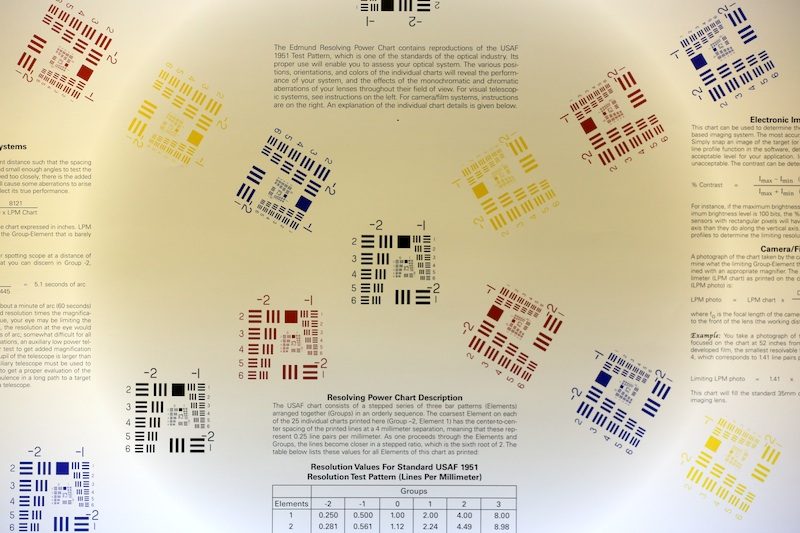
Then we tested several others copies of the lens…
and they all did it. Then we realized the initial intake testing had been done on Canon 5D Mk IIs and when we tested them back on those cameras, they were fine.
That made the answer pretty obvious, and sure enough, if we saved the shot in raw, rather than jpg, the reverse vignetting went away. Below is the raw version of the same shot as above, converted outside the camera rather than saved as the in-camera jpg.
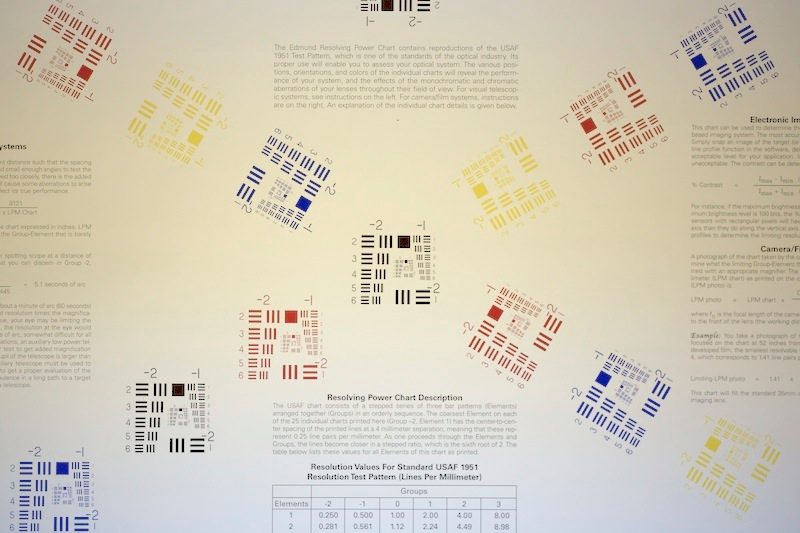
Obviously there’s an issue with the camera’s automated illumination correction and the Sigma 180 OS f/2.8 Macro.
If you shoot LiveView, you will see the reverse vignetting on the LCD, but if you shoot through the viewfinder you won’t see it. We did a bit of investigation and here’s what we found:
- The phenomenon shows up on Canon 5D Mk III and 1Dx cameras only. T4i and 7D bodies with firmware upgrade do not do this, nor do any other older cameras we could test.
- The Sigma 180 OS and Sigma 150 OS macro lenses both show the effect and its identical. No other Sigma lenses that we stock showed the effect, nor did any Tamron or Tokina lenses. Obviously I can’t test what we don’t carry.
- If you turn off Illumination Correction in the menu the effect goes away. To repeat, though, Illumination Correction in the 7D and T4i–on or off–doesn’t cause the effect.
My first thought was that the Sigma lenses were using a Canon lens ID that required a lot more vignetting correction than this lens really does.
If that were the case though, I would expect the 7D and T4i would apply similar corrections, but they don’t seem to. Maybe one of you guys can figure it out.
Roger Cicala
Lensrentals.com
August 2012
12 Comments
Brad Sheard ·
Interesting–I recently rented the Sigma 150 OS macro and was using it on a borrowed 5DmIII. I was having problems with flash TTL with a Canon 430. I had to dial up the flash exposure compensation 2 full stops to get a decently exposed image. Couldn’t figure out what was going on at the time. Maybe there’s more than one issue going on here.
Xi Zhao ·
Roger,
I think it didn’t show on 7D and T4i only because the camera has an APS sensor.
The correction used by sigma apparently is for a lens with significant drop near the edge of its image circle , which is close to the corner of 36mm sensors but not APS.
intrnst ·
Bull’s eye, Mr Zhao
http://tiny.cc/i88tiw
http://tiny.cc/w98tiw
DR. GUILLERMO SIMON-CASTELLVI ·
Due to its attractive price, I recently bought a SIGMA 120-300mm F2.8 EX DG OS APO HSM to test my new CANON EOS 5D Mark III in Saint Peter’s Basilica (The Vatican) and soon discovered that the lens did not focus properly with the new Canon camera. It worked properly with my old Canon EOS 7D. I returned the lens and asked for a refund. Sigma lenses are not properly tested prior to reach the stores. The frequent problems with Sigma lenses, and other products (e.g. focusing problems with Nikon D800) should convince manufacturers to perform intensive beta-testing before launching their products!
Jakub ·
The same in Sigma 85 1.4 with 5D Mark II. And solution, the same -> turn of Illumination Correction in body.
robert cook ·
I think it is a firm ware issue in the canon camera,, to make Non canon lenses not function properly, on purpose. Something on the same line as making canon EF (s) mount lenses NOT function on EF bodies so you are forced to buy a EF mount glass, if you up grade to a full frame body. Tamron , Tokina and Sigma lenses fit both canon body mounts,, why would canon NOT do the same thing ??? I believe it is a FORCED consumer up grade surprise !! Why would canon want to support after market lenses and make them work ? I have tried a new Sigma lens on a canon 7d body ,, and and talk about RUSSIAN ROULETTE FOCUS ISSUES !!!! WOW ! It makes there normal OUT OF FOCUS ISSUES LOOK TAME !! I believe it is PLANNED ERROR , for NON FUNCTION support !!! canon’s answer,, blame SIGMA !!
Piotr Krochmal ·
For me its simple, Illumination correction = shitty name for vignetting correction. As long as Canon didn’t make proper test and proper correction for Sigma lenses, body try to use what he has – presets for different lenses. So we got halos – unproperly corrected vignetting.
Back to work 🙂
Dominic Schulz ·
Well thats nothing new. My Sigma 50 1.4 did this over a year ago on my 5D2. Just turn off illumination correction for shooting jpeg and converting raws via canon dpp. third party raw converters do not read the vignetting info out of the raw files and hence are not affected. its not a problem with the lens itself, just a software issue.
btw: interestingly, a freshly bought 50 1.4 did not show the effect on my 5d3.
Kai ·
Roger,
Canon actually recommends to turn off Peripheral Illumination Correction and Chromatic Aberration Correction for non-Canon lenses in the 5D Mk III manual (see the warning box on pg 149 of the English manual). Seems that we now know why 🙂
John ·
this is also an issue on the Sigma 50mm and 85mm 1.4’s again just turn off the Peripheral illumination…
Other than that Sigma glass seriously rocks… I use Canon L and Sigma glass mix of primes.
Ertan ·
Same thing happens with Tokina 11-16mm f2.8 on 5DMarkII in JPEGs. I know this is not a FF lens but it fits and works pretty well on 15-16mm, and Peripheral … creates the same halos around. Turn off the Peripheral … (whatever) and you are fine.
Ivan ·
I see this on 5d3 with Tokina 16-28. It’s mostly noticeable at 2.8 at longer exposure