
Canon Illumination Correction and Third-Party Lenses
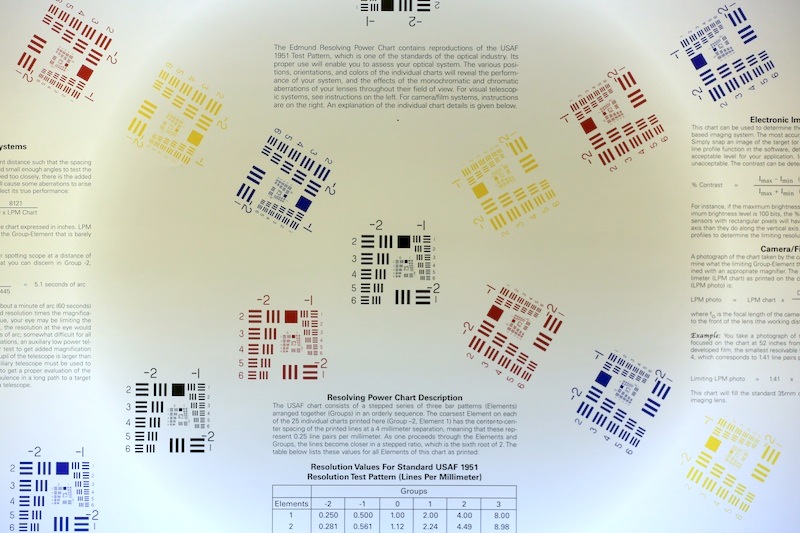
I while back I put out a notice that the Sigma 150mm and 180mm OS Macros had an issue if you shot JPGs on a Canon 5D Mk III and left peripheral illumination correction on. The camera auto-corrected for vignetting that wasn’t there, leaving an interesting pattern with a dark center and lightened edges and corners.
Several people emailed me about different combinations of cameras and lenses that did similar things. The interesting thing was some people clearly had the problem with a certain lens, but other people clearly didn’t have the problem with that same lens. Some people saw the same lens act up on one Canon camera but not a different one. Some people assumed it was because the third-party lenses identify themselves to the camera as this or that Canon lens. Several claimed only bad photographers noticed it; while others felt it was a rumor started by Canon to keep people from buying third-party lenses.
It was all very confusing. So I thought I’d spend a couple of hours trying to figure out what was actually going on.
That didn’t turn out like I expected. Instead of a couple of hours, it was over a week. In the end, though, we ended up with some useful information about what does cause the issue and debunked at least one myth. Like so many things we look into in our lab, it ended up creating some new questions, too. Plus it gave a few hints about how cameras and lenses talk to each other.
I’ll warn you, though, if you don’t use third-party lenses on Canon cameras, or you aren’t into how camera electronics work, you’ll find this very boring. If you just use third-party lenses, but don’t care about why this happens, just drop down to the last table and at least we’ll show you exactly when it will happen.
Other than that, this does provide yet another piece of evidence in the message I keep trying to deliver: When you ask about this Sigma lens or that Tamron lens only ask people who shoot the same camera that you shoot. Because third-party lenses do NOT behave the same on different cameras.
The Lens Identification Myth
A number of people felt this problem (and some others) resulted from third-party lenses identifying themselves to the camera, at least partially, as being a Canon lens. Rolando Ruzic linked me to Phil Harvey’s excellent ExifTool software, and I started doing some investigation into this. ExifTool (in the majority of cases) correctly identifies the third-party lens that is attached to the camera and also tells us what the lens tells the camera that it is.
We shot images with every third-party lens we stock on various Canon cameras and noted which Lens ID the lens was using. To make a very, very long story short – the lenses identify themselves the same way to every camera. So, the Tokina 12-24 f/4 PRO tells every Canon camera that it actually is a Canon 20-35mm f/2.8 L lens.
But the Tokina 12-24 (and a number of other third-party lenses) don’t have the peripheral illumination problem on every camera. It doesn’t matter what Canon camera the lens is mounted to (and we repeated it with every lens on every body), the third-party lens is always identified as the same Canon lens. So obviously Lens ID does NOT have anything to do with how peripheral illumination is controlled.
Because some will be interested, and because we went to the trouble to get the data, here are the various third-party lenses and what lens they actually identify themselves as to the camera, according to ExifTool.
| Lens | Canon Lens ID |
|---|---|
| Sigma 4.5mm | Canon 180 f/3.5 macro |
| Sigma 12-24 II | Canon 85 f/1.2 L |
| Sigma 20mm f/1.8 | Canon 14mm f/2.8 L |
| Sigma 30mm f/1.4 | Canon 14mm f/2.8 L |
| Sigma 50mm f/1.4 | Canon 17-35 f/2.8 |
| Sigma 70mm f/2.8 macro | Canon 17-35 f/2.8 |
| Sigma 85mm f/1.4 | Canon 17-35 f/2.8 |
| Sigma 105 f/2.8 macro | Canon 17-35 f/2.8 |
| Sigma 150 f/2.8 OS macro | Canon 100-400 L |
| Sigma 180 f/2.8 OS macro | Canon 100-400 L |
| Sigma 8-16 | Canon 85 f/1.2 L |
| Sigma 10-20 f/3.5 | Canon 85 f/1.2 L |
| Sigma 17-50 f/2.8 OS | Canon 85 f/1.2 L |
| Sigma 24-70 f/2.8 HSM | Canon 85 f/1.2 L |
| Sigma 70-200 f/2.8 HSM | Canon 135 f/2 |
| Sigma 70-200 f/2.8 HSM OS | Canon 135 f/2 |
| Sigma 50-150 f/2.8 OS | Canon 135 f/2 |
| Sigma 50-500 OS | Canon 135 f/2 |
| Sigma 120-300 f/2.8 OS | Canon 135 f/2 |
| Tamron 10-24mm | Canon 85 f/1.2 L |
| Tamron 17-50 f/2.8 VC | Canon 28-70 f/2.8 L |
| Tamron 17-50 f/2.8 | Canon 85 f/1.2 L |
| Tamron 24-70 f/2.8 VC | Canon 28-70 f/2.8 L |
| Tamron 28-75 f/2.8 | Canon 35-80 f/4-5.6 |
| Tamron 28-300 | Canon 85 f/1.2 L |
| Tamron 18-270 VC PZD | Canon 28-105 f/3.5-4.5 |
| Tamron 70-300 Di VC | Canon 28-70 f/2.8 L |
| Tamron 90 f/2.8 Macro | Canon 70-200 f/2.8 L |
| Tamron 200-500mm | |
| Canon 20-35mm f/3.5-4.5 | |
| Tokina 10-17 | Canon 85 f/1.2 L |
| Tokina 12-24 F/4 PRO | Canon 20-35mm f/3.5-4.5 |
| Tokina 11-16 f/2.8 | Canon 20-35mm f/3.5-4.5 |
| Tokina 16-28 f/2.8 | Canon 28-70 f/2.8 L |
| All Voigt Zeiss as Voigt / Zeiss | Zeiss/Voigt |
Please note that all Zeiss and Voigtlander manual focus lenses identify themselves only as Zeiss/Voigtlander MF lens, even if they have AF confirmation. This suggests that the lens identification may have something to do with telling the camera what AF signals to send to the lens motor. All completely manual lenses (Rokinon, Schneider, etc.) do not identify themselves at all.
Have I Mentioned I Really Started to Hate This Study?
In looking at all of the data ExifTool provides, we noticed there was a section regarding peripheral illumination. It told us if Peripheral Illumination Correction was on or off, and gave a numeric value associated with the correction. We spent a lot of hours looking at the numeric values. At first, we incorrectly assumed the numeric value was the issue. Since it changes from one lens to another we thought the Lens ID might be assigning an incorrect numeric value to the third-party lenses.
So we literally took several hundred images with a dozen different lenses. We varied focal length, ISO, illumination, zoom range, cameras, and lenses. We plotted that peripheral illumination number with every possible combination and variable. The data filled up 12 pages on a legal pad and we painstakingly put it all in an Excel spreadsheet. We analyzed it. We charted it. We cussed at it. When we were finished, we just cussed.
Because that number varies with all kinds of things: lens, ISO, focal length sometimes, but not others. Most importantly, it’s not the same for a third-party lens and for the Canon lens the third-party lens identifies itself as. For example, the Sigma 180 f/2.8 OS is identified as the Canon 100-400, but the numerical value they show in the peripheral illumination section are different.
Testing Some Canon Lenses
We did notice one other thing of interest, though. When we tested Canon lenses with the Peripheral Illumination function turned off, the Exif data showed peripheral illumination was off for every lens. If we tested Canon lenses with Peripheral Illumination turned on, the Exif data showed Peripheral Illumination was on, unless the camera didn’t have data for the lens.
In other words, if you look at the Peripheral Illumination menu on the LCD with the lens mounted, the camera either tells you that it has data for that lens, or that the data is unavailable. The newest lenses and tilt-shifts lenses don’t have peripheral illumination data. We tested every camera, including the 5D III, 1Dx, and 7D with new firmware. When no data is available, peripheral illumination is automatically turned “Off” according to the Exif data even though you have it turned on in the menu.
| Canon Lens | LCD reading | EXIF state |
|---|---|---|
| 14 f/2.8 L II | On | on |
| 17 TS-E | no data | off |
| 24 f/1.4 L | On | on |
| 24 TS-E | no data | off |
| 24 f/2.8 | On | on |
| 24 f/2.8 IS | no data | off |
| 28 f/1.8 | On | on |
| 28 f/2.8 IS | no data | off |
| 35 f/2 | On | on |
| 35 f/1.4 | On | on |
| 40 f/2.8 STM | no data | off |
| 50 f/1.4 | On | on |
| 50 f/1.2 L | On | on |
| 50 f/2.5 macro | On | on |
| 85 f/1.8 | On | on |
| 85 f/1.2 L | On | on |
So we went back to our 6-page spreadsheet and checked two camera-lens combinations we knew had the problem. Sure enough, when either a Sigma 180mm f/2.8 OS Macro or a 150mm f/2.8 OS Macro was mounted to a Canon 5D Mk III Exif data showed peripheral illumination was ON. The other Sigma lenses we’d tested showed peripheral illumination was OFF in the Exif data when mounted to a 5D Mk III.
I’d gotten an email and some pictures that morning from someone who complained their Tamron 70-300 VR did something quite similar so I mounted it to a 5D Mk III and took some shots. I hadn’t seen any problems when shooting that lens on a 5D Mk III, and the Exif data said, as it should, that peripheral illumination was OFF. Just for grins, though, we mounted the same lens to a 5D II and ‘Eureka!’ there was clearly some abnormal peripheral illumination in the jpg, and the Exif data on the 5D II screamed that Peripheral Illumination was ON in the Exif data.
And Then There was Grunt Work
After that it was a simple, if very time consuming, task to test every third-party lens on every camera. If Peripheral illumination showed ON in the Exif data we compared JPGs and RAW images to confirm that there was some peripheral illumination correction being applied. We could generally tell the difference easily, although sometimes it was pretty subtle. And some of the “ON” combinations involved crop-sensor lenses mounted to full-frame cameras, so they aren’t really important.
We tested most of the third-party lenses we carry on several different Canon bodies we stock. I’ve presented the results in the table below. If a lens-camera combination says ON in the table, then according to Exif data it was turned on even though the camera’s LCD menu said it had no data for that lens. When that lens is mounted to that camera, the camera is applying Peripheral Illumination Correction even though it has no data for that lens.
| Lens | 5DIII | 5DII | T4i | 7D/2.0 | 7D/1.2.5 |
|---|---|---|---|---|---|
| Sigma 4.5mm | off | off | off | off | off |
| Sigma 12-24 II | off | off | off | off | off |
| Sigma 20mm f/1.8 | off | off | off | off | off |
| Sigma 30mm f/1.4 | off | off | off | off | off |
| Sigma 50mm f/1.4 | off | off | off | off | off |
| Sigma 70mm f/2.8 macro | off | off | off | off | off |
| Sigma 85mm f/1.4 | off | off | off | off | off |
| Sigma 105 f/2.8 macro | off | off | off | off | off |
| Sigma 150 f/2.8 OS macro | ON | off | off | off | off |
| Sigma 180 f/2.8 OS macro | ON | off | off | off | off |
| Sigma 8-16 | ON | off | off | off | off |
| Sigma 10-20 f/3.5 | ON | off | off | off | off |
| Sigma 17-50 f/2.8 OS | off | off | off | off | off |
| Sigma 24-70 f/2.8 HSM | off | off | off | off | off |
| Sigma 70-200 f/2.8 HSM | off | off | off | off | off |
| Sigma 70-200 f/2.8 HSM OS | off | off | off | off | off |
| Sigma 50-150 f/2.8 OS | off | off | off | off | off |
| Sigma 50-500 OS | off | off | off | off | off |
| Sigma 120-300 f/2.8 OS | off | off | off | off | off |
| Tamron 10-24mm | off | off | off | off | off |
| Tamron 17-50 f/2.8 VC | off | off | off | off | off |
| Tamron 17-50 f/2.8 | off | off | off | off | off |
| Tamron 24-70 f/2.8 VC | off | off | off | off | off |
| Tamron 28-75 f/2.8 | off | off | off | off | off |
| Tamron 28-300 | off | off | off | off | off |
| Tamron 18-270 VC PZD | off | off | off | off | off |
| Tamron 70-300 Di VC | off | ON | off | ON | ON |
| Tamron 90 f/2.8 Macro | ON | off | off | off | off |
| Tamron 200-500mm | ON | off | off | off | off |
| Tokina 10-17 | off | ON | off | off | off |
| Tokina 12-24 F/4 PRO | off | ON | off | ON | ON |
| Tokina 11-16 f/2.8 | off | ON | off | ON | ON |
| Tokina 16-28 f/2.8 | off | off | off | off | off |
We confirmed that each of the lenses showing an inappropriate “ON” signal in the Exif data does have some odd illumination correction applied to in-camera JPGs, but not RAW images. It wasn’t usually as apparent as the Sigma 180 on Canon 5D III we’d seen originally. In several cases you really had to compare the RAW and JPG images to be certain it was there.
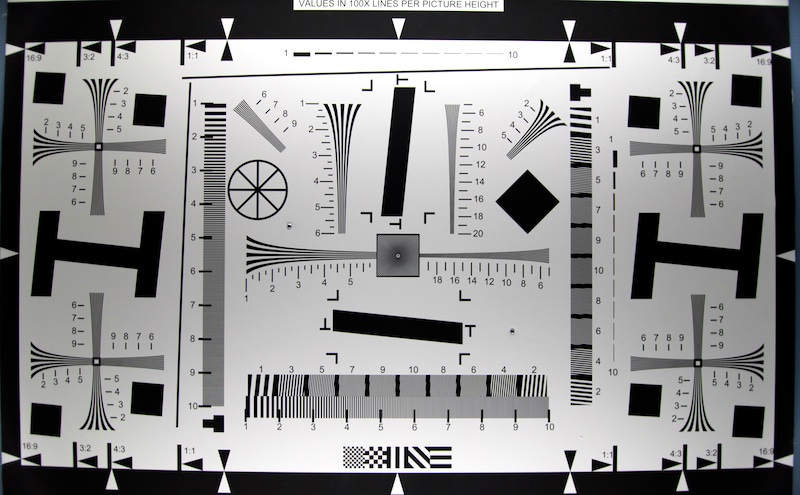
The image below, for example, is the Tokina 11-16 f/2.8 shot on a Canon 5D Mk II. It does show an odd illumination with the upper and lower center being lightened (the test chart in the picture is evenly lit to within a lumen across it’s entire surface). If this picture was a landscape you might not really notice it, or might just notice the darker edges and consider it vignetting. But if you shoot the same image in RAW and then convert it to JPG, or shoot it with peripheral illumination turned off, the chart appears evenly lit.
With all of the “ON” lenses in the table above, if you turn the Peripheral Illumination Correction off in the camera’s menu, the Exif data shows it is, indeed, off.
I only have gathered data for 4 of the Canon cameras, taking the opportunity of a recent firmware upgrade to compare the 7D with versions 1.2.5 and 2.0 firmware. If you don’t see a lens-camera combination you are interested in, please email me. Not as in ’email me and ask me to check it.’ Instead, download Exiftool and email me the results after you’ve done the test yourself and I’ll post it.
I am completely and totally done with this. I’ve removed Exiftool from every computer I own. I will never check this stuff again. Ever. Probably.
More Questions, of Course
If you’ve been following the blog lately, you probably realize I have an amazing inability to stick to one subject for very long. But much of my interest lately has revolved around how cameras and lenses communicate during autofocus. This ended up being yet another camera-lens communication issue, and it’s a bit puzzling.
Canon cameras know if a Canon lens is mounted, but there is no peripheral illumination data available, don’t try to correct peripheral illumination. When a third-party lens is mounted, they usually know to not correct peripheral illumination, but not always. It varies from camera to camera and lens to lens. There’s no obvious pattern to it that I can see.
It doesn’t appear to have anything to do with the Lens ID the third-party lens uses. It changes from camera to camera. While we only have one example of a firmware upgrade tested, that didn’t change any of the 30 something lenses we tested on that camera.
I don’t even understand what the “OFF” signal is. If it was a simple code from the firmware of the lens, then I would expect one lens to have problems on all cameras. But not one lens has the issue on every camera tested.
So if some of you understand what’s going on better than I do, help me out and post a comment. I’ve found out what is going on. I would love to understand why.
Roger Cicala
Lensrentals.com
August 2012
20 Comments
Dave Dugdale ·
Wow thanks for all the hard work on this one Roger. I have the Tamron 24-70 VC on my 5D3, so that is good info to know.
john edwards ·
Roger you are the man. With the long weekend coming up I suppose you are going to do this test with Nikon cameras for Tuesday’s Blog.
Me, I’ll be in Finland on Tuesday so excuse me if I don’t comment.
John
Roger Cicala ·
John,
I don’t think Nikons have the peripheral illumination issue with third-party lenses like this. But regardless, I’m going back to testing Nikon AF systems for the other article I promised to have ready two weeks ago.
Roger
Charles Lanteigne ·
(I apologize if this has already been assessed, I just didn’t see it mentioned in the article.)
Using Canon’s “EOS Utility”, you can manually register/unregister lens correction data in cameras that support Peripheral Illumination Correction. Have you checked that the lens profiles of the Canon-lenses-the-third-party-identify-themselves-as had been equally registered in all the cameras?
For example, for my 5D Mark II, I registered only the profile for the lenses I own, which excludes the EF 20-35mm (since there is no way I’d ever use that lens), so I would imagine, on my 5D Mark II, the Tokina 12-24mm would NOT present the issue.
Makes sense?
Joe ·
Geek, we all appreciate the extensive work you do. I can see how ‘liar lenses’ can be a huge issue if in the wrong hands. Knowing 3rd party folks won’t update their lenses, can we ask Canon to include a ‘lens is a liar’ in the MFA menu?
Siegfried ·
Dear Roger,
As a geek I can only explain it the following way: that different cameras (by a camera I mean a certain model running under a certain firmware) go with different lens databases inside. Or with different versions of the same database. This is the theory – more or less probable, though slightly absurd – which fits your results, although it doesn’t make any sense to me from IT-engineering perspective.
And by the way, you’ve done a great work, sir!
Alles gut,
Zig
mshafik ·
Exactly what Charles said, I came here to tell you this, but he explained it very good.
Roger Cicala ·
Charles and Mohamed,
That makes perfect sense. As a rental house, though, we aren’t able to do that so having the data available will help our renters who get a camera and third-party lens know what to expect. Or really, at least know they need to check before shooting 1,000 jpgs and finding out their all not quite right.
Thanks for the input — I think every third-party lens owner should be doing exactly what you describe.
Roger
Roger Knight ·
Roger –
Now that you’ve shot so many extra exposures for this test and your Leica MM review would it be possible to get a deal on a “well used” 5D MK3? I don’t shoot Canon, but with the right incentive I might be tempted.
Aloha.
StefanMc ·
For each camera model was the same body used for all the tests? If so, then it doesn’t seem likely the illumination correction database in the camera is the cause of the problem.
For instance both the Tamron 70-300 Di VC and 17-50 VC use the 28-70L ID code, but only the 70-300 showed the issue here. Same with the lenses using the 85 f/1.2 ID code, the Tokina lens and some of the Sigma lenses using that code showed problems, but the Tamron one didn’t… If several bodies of the same model were used to get the data for the charts this doesn’t really mean anything though, which I am hoping is the case.
Roger Cicala ·
Stefan,
I’m not sure I understand the question, but in each case we tried several copies of each lens on a couple of copies of the camera. Every Tamron 70-300 or 17-50 identify themselves as 28-70s. On some bodies they get automatic peripheral illumination correction (every copy of the 70-300 placed on any copy of the 5D II, for example). Which is why we don’t think lens ID has anything to do with peripheral illumination correction.
Roger
Caleb Luke ·
Unfortunately I am experiencing this with the Sigma 180mm 2.8 OS on both my 5D MKIII and 1DX, both JPEG and RAW.
Rohan Gupte ·
Roger,
Thanks for all the hard work. I rarely use third party lenses with my Canon body so this may not pertain much to me. But there was one other thing on the PIC that I had encountered when I did some testing a few weekends ago. I upgraded by 5D Classic to a MKII and found some odd behavior with PIC, focusing and the self-timer function combined together. I did this testing on a 5D and then the Mk II. In case you find yourself without a thing to explore or look into, I would welcome if you wanted to look into the issue that I extensively blogged about here: http://www.rohangupte.com/blog/files/upgrading-canon-5d-to-canon-5d-mark-ii.php
Thanks for all that you do – I don’t say this often to you…
Regards,
Rohan
jn ·
Two discontinued lens + older version of Sigma 70-200mm.
Lens 3rd. party …
With Canon 5DIII Peripheral illumination turned on.
Sigma 24-60mm f2.8 EX DG
exifTool reports …
Lens Type … Canon 28-70mm f2.8L or Sigma or Tamron lens
Lens ID …….. Sigma 24-70mm f2.8 EX
Peripheral illumination state off, value 0.
Sigma 17-35mm f2.8-4.0 EX DG HSM (later of these models)
exifTool reports …
Lens type … Canon EF 28-80mm f2.8-4L or Sigma lens
Lens ID ……. 100% correct ID of this lens
Peripheral illumination state off, value 0.
Sigma 70-200mm f2.8 APO EX HSM (film era version)
exifTool reports …
Lens type … Canon 28-80mm f2.8-4L or Sigma lens
Lens ID ……. Sigma APO 50-150 f2.8 [II] EX DG HSM + 1.4x
Peripheral illumination state off, value 0.
ruevs ·
Hi Roger,
Here is a theory:
Apart from the lens type the lens reports to the camera its focal length range, the currently set focal length and the maximal aperture.
While using IDs of existing Canon lenses (simply because Canon would not allocate their own) third party lenses may report their actual focal length range and aperture.
Using the above data the camera firmware can distinguish the third party lens from the Canon lens it “mimics”(this is what ExifTool does I believe). Once it has done this it is logical to not apply illumination correction in order to avoid the described problem.
The discrepancies may be due to the database in the firmware of different cameras being different (more or less complete, more or less wrong). I can not imagine Canon putting too much effort into this – it is a great opportunity to say “Use only Canon lenses, we do not guarantee results with anything else”.
Here is an example of the camera firmware logic that I am suggesting (built from your data above):
“A lens that identifies itself as Canon 85 f/1.2 L but reports a focal range 17-50 and f/2.8 must be a “Sigma 17-50 f/2.8 OS”
Brent March ·
I have experienced this problem with the Sigma 85 1.4 lens on my Canon 5D mark iii. I ordered replacement lenses as my camera store was puzzled as well and finally contacted Sigma who advised me of the peripheral illumination issue. I have used a wide variety of Canon lenses without issue on this camera but this venture left me in a conundrum. Love the lens but have a large headache.
Thanks for letting me know I wasn’t alone in this experience. You do good work.
Martin Helthuis ·
I have the new sigma 35mm 1.4 dg hsm. Could you tel me please with specific cannon lens it corresponds in the eos utility software? Thanks for doing this.
Thalis Valle ·
my 6d has no data to corret the aberration lens with sigma 24mm 1.4 art. how i can update this?
transiently permanent ·
I’m pretty certain Canon does not produce or distribute correction data for non-Canon lenses.
John Murrell ·
The more recent Canon cameras ( 70D onwards ?) not only correct for illumination but also correct for distortion ie barrel or pincusion as well as correcting for colour fringing. I beleive this happens in camera when shooting JPEGS and is applied to RAW images when using the Canon DPP software in a computer. In both cases of course the data for the lens has to be available either in camera or to the DPP software.
It would be interesting to carry out a similar set of tests to the above to see the effect of the corrections on non Canon Lenses both in camera with JPEGs and in the DPP software with RAW images.
The tests will be quite complicated as the correction depends on the focal length & possibly aperture as well.